

How to I fix the stick drift
The stick drift is small but irritating
Bu iyi bir soru mu?
Puan
10
İtibar: 121
 2
2
 2
2
 1
1
The stick drift is small but irritating
Bu iyi bir soru mu?
İtibar: 52,5b
20
20
35
Hi!
Stick drift can only be repaired by replacing it!
Note, that you do need soldering skills to replace it, it won't be easy.
While you are there, I recommend to replace them for Hall-Effect joysticks straight away when one of them is defective.
Guide: DualSense Joystick Replacement - iFixit Repair Guide
If you need any more information, please let us know!
Bu yanıt yardımcı oldu mu?
don't have to replace the whole joystick just need to remove the potentiometers on the side especially if the tracks have deep scratches in them sometime but not always you can take those carefully out and clean them, but more often the whole potentiometer (the green piece) needs to be replaced due to the track being beyond repair.
Tronicsfix on YT does amazing videos on this and much more.
Yes that does work as well! But not all time, sometimes the whole stick need to be replaced. If you are there, I would recommend to replace it completely.
The Gulikit TMR joystick's compatibility specifications state that it is only compatible with PS5 DualSense controllers V1 + V2. Is that correct? Or are the joysticks also compatible with V3?
Should be compatible with others as well :).
İtibar: 37
1
Contact cleaner. DeOXit is the one I use most often.
You dont need to replace or solder anything. Take the controller down to the point that you can take the sticks off. Pull them off. Blow a quick spritz of deoxit into the middle of each assembly, waggle the stick around a bit, wipe/blow off the excess, and there you go.
I have no idea why everyone seemingly forgot this around 2015 or so. Analog controllers have been the same arrangement of X/Y potentiometers since like 1950 something, they have always gotten dirty, which manifests as "drift", and contact cleaner has always fixed it.
Bu yanıt yardımcı oldu mu?
İtibar: 607
4
Replacing the stick modules is the only permanent answer. Fit hall sensors instead of the original mechanical ones. You can only clean the mechanical ones once or twice as it doesn’t fix the worn out parts. I just replaced the sticks in my four controllers for Hall effect ones and to be honest they’re better than the originals.
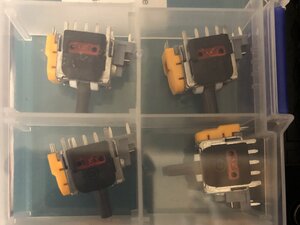
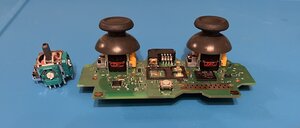
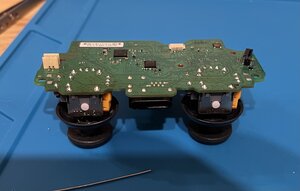
Bu yanıt yardımcı oldu mu?
Son 24 Saat: 31
Son 7 gün: 179
Son 30 gün: 893
Her zaman: 20,752




1 Yorum
Before you try to fix it (like opening the controller or changing software deadzones), you need to know exactly *how bad* the drift is.
Many games hide drift, so testing in-game is unreliable. You need to check the raw hardware data.
I use a web tool for this called **controllertest.com**.
When you connect your controller, look at the 'Data Panel' numbers for the sticks. If they are moving (e.g., 0.08 or -0.12) while you are not touching them, you 100% have a hardware problem. If the numbers are 0.00000, your problem is software.
This way, you know if you need to buy a new controller or just change a setting.
YASSINE Bounaijat tarafından