Ana içeriğe geç
Onarım Topluluğuna Katılın - Hesap Oluşturun

Lenovo Yoga C930-13IKB, dokunmatik ekran, parmak izi okuyucu ve tablet modu özelliklerine sahip bir 2'si 1 arada dizüstü bilgisayardır. Cihazla birlikte Lenovo Active kalem, 65W AC adaptör, 4 hücreli 60WHr Li-Polimer batarya ve bir hızlı başlangıç kılavuzu gelmektedir.

Computer not turning on after a battery replacement

So I did a battery swap, using an iFixit-purchased battery and following their procedure. Everything went smoothly. At no point was I worried that I had broken something. But when I went to power up and turn on the laptop, the whole thing refuses to turn on. Here's what I tried:

  • Plugged into a 60W USB-C charger: no signs of life.
  • Plugged into the 65W USB-C charger that came with the laptop: It does appear to charge - charging light showed orange, then eventually turned to white. I also verified with a USB meter, and it showed the computer drawing about 30W.
  • Pressing the power button, either on or off the charger, turns on the light on the power button, but there's no other signs of life.
  • Long press of the power button (10s, 30s, 1m) doesn't do anything.
  • I opened up the laptop and removed the battery. Did a long press on the power button. Plugged in to power without the battery installed. Put the battery back in and reseated the connector. No change in condition.
  • I plugged in a USB-C dongle. It seems to draw power, but otherwise no sign of life.
  • I plugged an HDMI cable into the USB-C dongle, in case there's a problem with the screen: no sign of life.
  • I tried turning on and off the keyboard backlight in various conditions: no sign of life.

Usually for startup, you press the power button and the fans kick on, the keyboard lights up, and the screen turns on. No sign of any of that.

Resim
Resim
Bu soruyu yanıtla Ben de bu sorunu yaşıyorum

Bu iyi bir soru mu?

Puan 2
8 Yorum

Lenovos have LCD self test:

Plug in AC and

Press Fn, left Ctrl, and the power button at the same time

(if it works you see a screen of each colour/black/white for a few seconds each)

At least you'll know then if its the screen or not...

tarafından

@virtourist_1 have you let the battery charge up long enough? How many Amps is your computer drawing from the power supply?

tarafından

@oldturkey03 Yeah, it seems sufficiently charged up. Currently reading 0.000-0.02A

tarafından

@virtourist_1 that is the amperage that your computer is drawing when you plug it in? where are you measuring that amperage?

tarafından

@oldturkey03 Correct. Reading from an inline USB Volt/Current meter

tarafından

3 tane daha yorum göster

Yorum Ekle

2 Cevap

Filtre ölçütü:
En Yararlı Yanıt

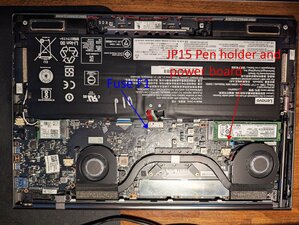
@virtourist_1 okay so it looks like your board is a C930-13IKB EYG70 NM-B741 and I do have the schematics for that. NM B741 EYG70 Motherboad Schematic Now we'll have to start somewhere, right? Start with the power fuse F1. First check for continuity and then you can check for voltage on the fuse. Are you okay with doing the measurements? I had to post this as an answer even knowing that it will be incomplete due to the picture. We can only post pictures in Answers or Question but not in comments. This may take a few pictures etc. so I will always update this as an ongoing answer until we either get your beast working again or we capitulate ;-)

Resim

Here is the service manual for your computer Lenovo Yoga C930 13IKB Hardware Maintenenace Manual your beast has a power board combined with the pen holder. Check the flex cable to make sure everything is still properly connected. Page 44 of the SM shows more

Update (04/28/25)

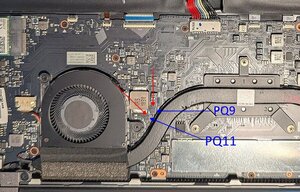
@virtourist_1 that means your board get power from the battery but we are not sure about getting power to the board yet. We are looking for the VIN rail.PU9 would be my next check. That is a battery controller. Measure the voltage on Pin 5 of PQ9 and pin 5 and 4 of PQ11 Check that with your battery disconnected and then connected.

Resim

Update (05/07/25)

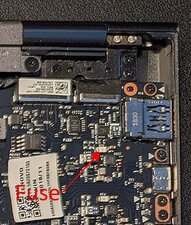
@virtourist_1 okay so it's drawing about 1.5Amps I wonder if the issue is your charging IC. Your AC adapter deliver 20 V and it sems all your board shows is battery voltage. You comfortable with checking the voltage on your IC U1002 pin 3 (IC right by JP4)? Or you can check the voltage on fuse PF5 (with your AC adapter connected)

Resim

Bu yanıt yardımcı oldu mu?

Puan 2

9 Yorum:

!! Thanks for the schematic! To answer your questions:

"Start with the power fuse F1. First check for continuity and then you can check for voltage on the fuse."

F1 is good. It passed continuity, and I'm seeing the same battery voltage (~8V) on either side of it.

"Check the flex cable to make sure everything is still properly connected."

Flex cable looks good. I unseated and reseated it just to be safe.

tarafından

"PU9 would be my next check. That is a battery controller. Measure the voltage on Pin 5 of PQ9 and pin 5 and 4 of PQ11"

Battery Voltage: 8.42V

PQ9 Pin 5: 8.42V

PQ11 Pin 5: 0.70V

PQ11 Pin 4: 0V

tarafından

Hello, @oldturkey03, just checking to see if you got my readings on the PQ chips.

I've also reached out to iFixit support for this problem.

tarafından

@virtourist_1 sorry, I really did not see the notification. Those readings look good. What voltages do you get on that when you connect the power? supply"

Also, connect your USB ammeter and see what your computer draws from the power supply with and without the battery.

tarafından

"What voltages do you get on that when you connect the power supply?"

When connected to the charger:

Battery Voltage: 8.75V

PQ9 Pin 5: 8.78V

PQ11 Pin 5: 8.80V

PQ11 Pin 4: 0.00V

"Also, connect your USB ammeter and see what your computer draws from the power supply with and without the battery."

With battery connected: 13 W (slowly dropping, presumably from battery charging, as seen by the slowly increasing Vcc voltages above as I took measurements).

Without battery connected: 0.00 W, occasional jumps to 0.40 W

One additional note: I took a look at the battery connector on the board (JP12), and noticed that Pin 12 had gotten bent at some point, such that it was pushed into Pin 11. I managed to bend it back in place, which makes seating the connector a lot easier.

According to the schematic, this bent pin wouldn't change the nature of the problem, since JP12 Pin 11 and Pin 12 are both the same voltage/function.

tarafından

4 tane daha yorum göster

Yorum Ekle

Well You can try the following:

  • Double-check Battery Installation
  • Try Powering Without the Battery
  • Inspect for Loose Connections
  • Check the Power Adapter
  • Check for Lights or Sounds

Bu yanıt yardımcı oldu mu?

Puan 0
Yorum Ekle

Yanıtını ekle

eliasp02 sonsuza kadar minnettar olacak.
İstatistikleri Görüntüle:

Son 24 Saat: 0

Son 7 gün: 2

Son 30 gün: 30

Her zaman: 713