Ana içeriğe geç
Onarım Topluluğuna Katılın - Hesap Oluşturun

Released In December 2022. A Laptop equipped with a Intel Core I5 11400H And A GTX 1660, RTX 2080 or A RTX 3050 TI Also Equipped with 512 GB Of storage, 16 GB Of DDR4 Replacable Ram And has a 2nd M.2 NVMe slot, A 144 Hz 1080p screen, RGB Keyboard and 2 HQ Speakers With DTS.

Ethernet doesn´t work

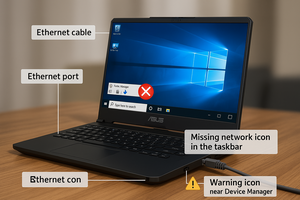
I Plug my ethernet cable to laptop and it doesnt show the ethernet icon, so it doesnt work

Bu soruyu yanıtla Ben de bu sorunu yaşıyorum

Bu iyi bir soru mu?

Puan 0

1 Yorum:

Hi! What does device manager tells you on the laptop? Any question or exclamation marks? Is the ethernet driver up to date? Did you tried a new re-install?

tarafından

Yorum Ekle

1 Cevap

Filtre ölçütü:

=== ***Quick Troubleshooting Steps

Block Image
  • ===
  • Check Ethernet Cable & Port:
    • Test the cable on another device.
    • Inspect laptop port for dust or bent pins.
  • Update/Reinstall Network Drivers:
    • Go to Device Manager → Network Adapters.
    • If you see Realtek Ethernet Controller, right-click → Update Driver.
    • If missing, go to Asus support site and install latest LAN driver for your model.
  • Enable Ethernet Adapter:
    • Control Panel → Network & Sharing → Change Adapter Settings.
    • Right-click Ethernet → Enable (if disabled).
  • Check BIOS Settings:
    • Restart and enter BIOS (usually F2 or DEL).
    • Ensure LAN Controller is enabled.
  • Try Different Port or Router:
    • Rule out router issues by connecting to another port or router.
  • Hardware Fault (if all fails):
    • If Ethernet still doesn’t work, the port might be physically damaged—consider using a USB to Ethernet adapter as a workaround.

Bu yanıt yardımcı oldu mu?

Puan 0
Yorum Ekle

Yanıtını ekle

Gaming Brothers sonsuza kadar minnettar olacak.
İstatistikleri Görüntüle:

Son 24 Saat: 0

Son 7 gün: 8

Son 30 gün: 30

Her zaman: 295