
 1
1 SSD Suddenly Stopped Working.
So, upon restarting my laptop, my 2.5" TeamGroup 2TB SSD stopped showing up. It wasn't showing in the BIOS or Windows. Later it started showing up as an unknown device in Windows, and still not at all in the BIOS.
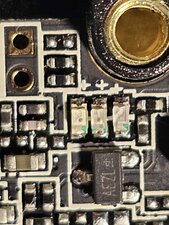
I popped it open to have a look, and the only think I saw that looked out of order were these semi transparent things. They look cracked.
What are these, and could they have caused the problem?
They look like fuses to me, and they are non conductive. There's absolutely no conductivity through them. Just OL with a multimeter.
Bu iyi bir soru mu?
Puan
0


Hi @psyrecxx
Just verifying that you opened the SSD?
Did you first check that it was still securely connected to the sata slot in the laptop and that there was power being supplied to it when the laptop was turned on?
jayeff tarafından
Yes, to both. I also tried using a SATA to USB adapter. Another drive worked in both.
Psyrecx X tarafından
@psyrecxx
Being non conductive doesn't mean that they're faulty.
The +ve symbol on the board above each component seems to indicate that they might be an electrolytic capacitor which might show OL on a DMM unless you first test them and then reverse the leads and test them again whereupon you may get a reading that doesn't stay for long as the capacitor is now discharging through the meter. A lot depends on its capacitance value of course.
Never found a schematic for any SSD online, you may have better luck.
Looking online you may be able to get a replacement under warranty as it seems that TeamGroup has a 3 or 5 year warranty on their SSDs Scroll down and select 06 Warranty Policy on consumer products → SSD series.
Of course your data may be lost unless you had a recent backup, can get it fixed or contact a data recovery service.
jayeff tarafından
Have you ever seen caps that look like those?
Psyrecx X tarafından
@psyrecxx
Admittedly no I haven't.
When testing did you test between the each outer connection and the centre connection of the component.
Didn't notice it before but it seems that they might have 3 connection points i.e one on each end of the component and one in the middle.
There seems to be a trace running under the middle of each component which they might connect to.
You may have to unsolder one just to verify whether it is has 2 or 3 connection points
The +ve symbol on the board at the end of each component is there for a reason as manufacturers don't usually mark it if it isn't necessary.
Maybe a dual diode perhaps idk
jayeff tarafından
1 tane daha yorum göster