

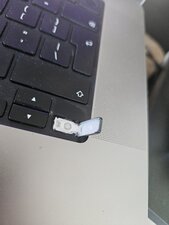
Slightly wonky key - M1 MacBook
My son picked the key off it still works and has some spring but is uneven
Does anyone know what part i might need to replace ?

Bu iyi bir soru mu?
Puan
1
İtibar: 13
 1
1
 1
1
My son picked the key off it still works and has some spring but is uneven
Does anyone know what part i might need to replace ?
Bu iyi bir soru mu?
İtibar: 7,8b
33
36
 8
8
I hope this video can help How to replace arrow keycaps on a MacBook Pro A2141, A2251, A2289 and A2338 M1 & M2 (2019 - 2022)
Bu yanıt yardımcı oldu mu?
İtibar: 502b
35
346
977
Son 24 Saat: 0
Son 7 gün: 5
Son 30 gün: 21
Her zaman: 187



Does any of the plastic on the key itself look broken/loose? If the clip-on area on the left side of the key is broken/bent, it may cause the issue you're describing. Also, make sure that there isn't anything stuck in between the key. Let me know if this helps at all.
Havyn K. tarafından
I think your right that the left side of the key cap is broken and its not attaching. I will try and replace and let you know if it works - thanks for taking the time to reply :)
albertmacstien tarafından
@albertmacstien Follow the video and remove the key cap and then try to reconnect it as the video shows, this would confirm if the key caps clips have broken away requiring a replacement.
livfe tarafından
@albertmacstien No problem! It's my pleasure. Good luck repairing!
Havyn K. tarafından