
Ana içeriğe geç
Onarım Topluluğuna Katılın - Hesap Oluşturun

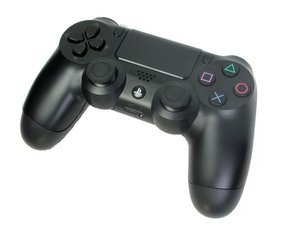
The DualShock 4 CUH-ZCT2 was announced in 2016 to replace the CUH-ZCT1 controller released in 2013. This controller is similar to the previous model.

What is causing my controller to act like this?

So for different controller I installed normal sticks and it won't charge or connect to my PC. I noticed on the four prongs on the analog stick that is R3( works in-game and camera spinning) were really short. I still can connect to my ps4 via wireless. I was able to press X to enter the game from the ps4 menu, but in the main menu when I pressed X it wouldn't register. So I removed a solder from that analog stick and then I was able to enter the game from its main menu still not charging nor I can connect to PC I was able to connect prior to replacing sticks.

Block Image
Block Image
Block Image
Block Image
Block Image
Bu soruyu yanıtla Ben de bu sorunu yaşıyorum

Bu iyi bir soru mu?

Puan 0

9 Yorum:

Hi!

Is it possible to sent us pictures from inside the controller? Maybe a trace is damaged.

Thank you!

tarafından

Hi, I uploaded the images

tarafından

They do not seems to be very damaged (just a little, but should be fine). If you check the most right side, is there a solder blup on the motherboard? Also, can you try to clean with isopropyl alcohol? Thanks!

tarafından

That could mean that the joystick could be faulty

tarafından

Could be, would try another one and see how it goes :)

tarafından

4 tane daha yorum göster

Yorum Ekle

2 Cevap

Filtre ölçütü:
Block Image

This is what I'm talking about in the red. It looks like the connector was damaged. Shouldn't there be a flat wire assembly that slides into that socket?

Bu yanıt yardımcı oldu mu?

Puan 0

6 Yorum:

I see I'm able to connect the the ribbon there and it works

tarafından

Hi, I forgot to mention that when I plug it in my ps4 it says too many USB devices connected it only does for this controller

tarafından

And all you did was replace the 2 joy sticks? Plugging that cable in doesn't mean it's still making a good connection. What you are describing should not happen with just the joy stick swapping. My guess is something go damaged while you had it open. If you have no other USB devices connected to your consul and it's giving you that error, something in its logic has failed and I don't know of any schematics available. What does that ribbon cable connect to at the other end (I don't have an open controller available)? What was your process f removing the old joy sticks, did you break them and then remove 1 lead at a time or did you try another method? We used to use flameless torches (hot air guns) with a quick pass to remove IC chips without destroying them but doing that you had to be real careful not to damage the board. If you knew the chip was bad, you just broke it and removed the individual leads. These boards are very delicate to heat as well as the chips on them.

tarafından

All I did was put in 2 joysticks. The way I do it is that I start by tinning them with lead solder, then I would bridge the three small pins for potentiometer( off course disconnect the potentiometer for the joysticks) I would heat the bridge with an iron and remove the potentiometer. Next I would use flush cutters to dismantle the joysticks the metal part, then heat the large 4 ground planes and individually remove them. I would continue to use the flush cutters to dismantle the joystick till I can individually remove the small 4 prongs that make up the R3/L3. I put in a new ribbon cable and it still won't charge.

tarafından

Hi, I looked through my board again and I found missed components on the front could that cause the controller not to charge?

tarafından

1 tane daha yorum göster

Yorum Ekle

I agree with @rickwag, the connector does not look very clean. Even if it's not damaged or melted, the solder flux I spot on the connector could stop the cable from being properly connected to the pins inside and mess up the charging port's functions. From the info you shared it seems like the controller functions all fine when wireless but fails to register clicks when plugged in/won't charge and the PS identifies too many accessories plugged in. That certainly points to either a charging port related issue or a faulty IC, and the latter is unlikely with only joystick swaps.

Try cleaning the connector first with a toothbrush and isopropyl alcohol and then test the functions with a new charging port and cable. It should solve the issues you encountered, as joystick sways don't really do anything to the wired connection/charging functions of the controller.

Also, this trace (the bottom right one in red) does not have enough solder applied so that's gonna malfunction:

Block Image


It still shouldn't lead to the charging issues but that'll make the right joystick malfunction. Make sure you apply enough solder to each pin so that they are connected to the traces on the motherboard.

Bu yanıt yardımcı oldu mu?

Puan 0

2 Yorum:

Hi, I cleaned the connector and it still won't charge I uploaded the photo

tarafından

Hi, I looked through my board again and I found missed components on the front could that cause the controller not to charge?

tarafından

Yorum Ekle

Yanıtını ekle

Christopher D sonsuza kadar minnettar olacak.
İstatistikleri Görüntüle:

Son 24 Saat: 9

Son 7 gün: 56

Son 30 gün: 71

Her zaman: 71