Bu çeviri bir makine tarafından oluşturulmuştur ve henüz bir kişi tarafından incelenmemiştir. Bu dili konuşuyor musunuz? İnceleme için.
Giriş
Eğer ASUS G73JH-BST7 veya ASUS G73 Gaming Series Dizüstü Bilgisayarınız artık şarj tutmuyorsa, büyük ihtimalle pil değişimi gerekiyordur. Cihazınızı sık kullandıkça, pil kullanım süresi zamanla azalabilir.
Şişmiş piller son derece tehlikeli olabilir ve ayrıca ASUS cihazınıza zarar verebilir. Eğer böyle bir durumdan şüpheleniyorsanız pili çıkarırken dikkatli olun.
Cihazınızı kapattığınızdan emin olun ve değişime başlayın.
-
-
-
Bilgisayarı, alt kısmı yukarı bakacak şekilde ters çevirin.
 FixBot'a Sor
-
-
-
-
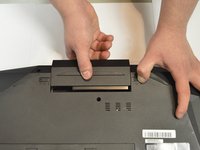
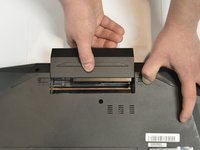
Kilitleme tırnağı olmayan tırnağı bir elinizle sabit tutun ve diğer elinizle bataryayı bilgisayardan uzağa doğru çekin.
-
-


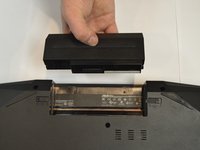
Cihazınızı yeniden toplamak için bu talimatları ters sırayla uygulayın.

Ekip

Purdue University Northwest, Team S1-G116, Hingst Fall 2018 Purdue University Northwest, Team S1-G116, Hingst Fall 2018 üyesi
PNW-HINGST-F18S1G116
3 Üyeler
36 adet Kılavuz yazıldı
