Ana içeriğe geç
Onarım Topluluğuna Katılın - Hesap Oluşturun

Afterglow Wireless PS3 Controller Vibration Motor Replacement

Neye ihtiyacın var

  1. Afterglow Wireless PS3 Controller Vibration Motor Replacement, Back Cover: adım 1, 2 resimden 1. Afterglow Wireless PS3 Controller Vibration Motor Replacement, Back Cover: adım 1, 2 resimden 2.
    • Lay the controller face down on a flat surface and remove the seven 9mm Phillips #0 screws on the back of the controller.

    • Lift up and remove the controller back plate.

    FixBot'a Sor

    Yorum Ekle

  2. Afterglow Wireless PS3 Controller Vibration Motor Replacement, Vibration Motor: adım 2, 2 resimden 1. Afterglow Wireless PS3 Controller Vibration Motor Replacement, Vibration Motor: adım 2, 2 resimden 2.
    • Carefully remove the battery by lifting it straight up from its place.

    • Keep in mind that the red and black battery wires are attached to the motherboard. Handle these with care.

    FixBot'a Sor

    Yorum Ekle

  3. Afterglow Wireless PS3 Controller Vibration Motor Replacement: adım 3, 1 resimden 1.
    • Unscrew the four 9mm Phillips #0 screws that are attached to both joy stick control mini-motherboards. There are two screws for each mini-motherboard.

    FixBot'a Sor

    Yorum Ekle

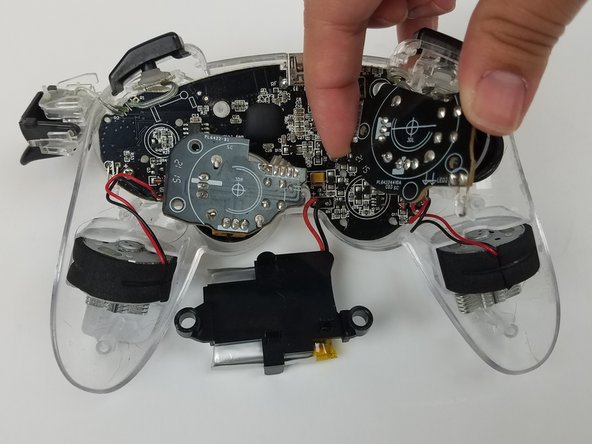
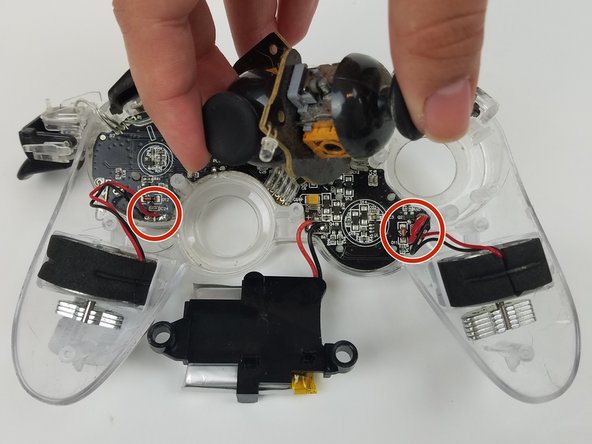
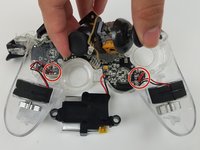
  4. Afterglow Wireless PS3 Controller Vibration Motor Replacement: adım 4, 3 resimden 1. Afterglow Wireless PS3 Controller Vibration Motor Replacement: adım 4, 3 resimden 2. Afterglow Wireless PS3 Controller Vibration Motor Replacement: adım 4, 3 resimden 3.
    • Jiggle both joy stick control mini-motherboards out of their holding place.

    • Set aside the mini-motherboards so that the vibration motor wire connections are accessible.

    FixBot'a Sor

    Yorum Ekle

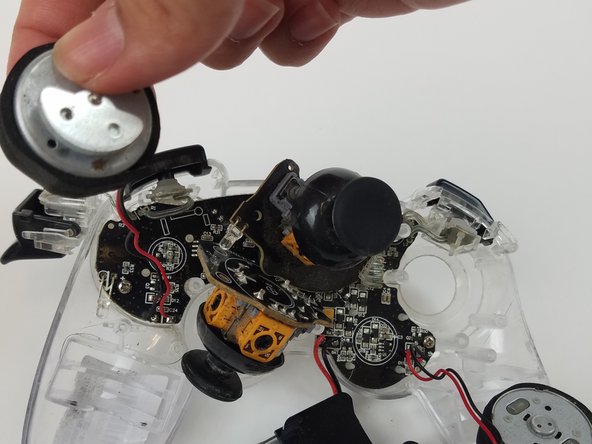
  5. Afterglow Wireless PS3 Controller Vibration Motor Replacement: adım 5, 2 resimden 1. Afterglow Wireless PS3 Controller Vibration Motor Replacement: adım 5, 2 resimden 2.
    • Pull both vibration motors straight up from their holding place.

    FixBot'a Sor

    Yorum Ekle

  6. Afterglow Wireless PS3 Controller Vibration Motor Replacement: adım 6, 1 resimden 1.
    • Use the soldering tool to heat the solder connecting the red and black vibration motor wires to the motherboard to detach the vibration motors.

    • Use this guide for further details on how to solder.

    FixBot'a Sor

    Yorum Ekle

Sonuç

To reassemble your device, follow these instructions in reverse order.

İptal et: Bu kılavuzu tamamlamadım.

Natalie Cox

Üyelik tarihi: 02/17/17

207 İtibar

2 adet Kılavuz yazıldı

Ekip

USF Tampa, Team S19-G5, Hoffman Spring 2017 USF Tampa, Team S19-G5, Hoffman Spring 2017 üyesi

USFT-HOFFMAN-S17S19G5

4 Üyeler

20 adet Kılavuz yazıldı

0Kılavuz Yorumları

Yorum Ekle

İstatistikleri Görüntüle:

Son 24 Saat: 1

Son 7 gün: 4

Son 30 gün: 34

Her zaman: 1,504