Ana içeriğe geç
Onarım Topluluğuna Katılın - Hesap Oluşturun

Aluratek ADMPF310F Remote Sensor Replacement

Neye ihtiyacın var

    1. Aluratek ADMPF310F Remote Sensor Replacement, Screen: adım 1, 3 resimden 1. Aluratek ADMPF310F Remote Sensor Replacement, Screen: adım 1, 3 resimden 2. Aluratek ADMPF310F Remote Sensor Replacement, Screen: adım 1, 3 resimden 3.
      • Using the plastic opening tool, pry off the clips all around the frame. You will hear a popping sound for every clip

      • Be sure not to pry to hard because you could crack or break the plastic facing of the device.

      FixBot'a Sor

      Yorum Ekle

    2. Aluratek ADMPF310F Remote Sensor Replacement: adım 2, 1 resimden 1.
      • Lift screen out of place so you can access the plugs that connect it.

      • Be careful not to pull the screen to far away when placing to the side, many fragile wires are connected.

      FixBot'a Sor

      Yorum Ekle

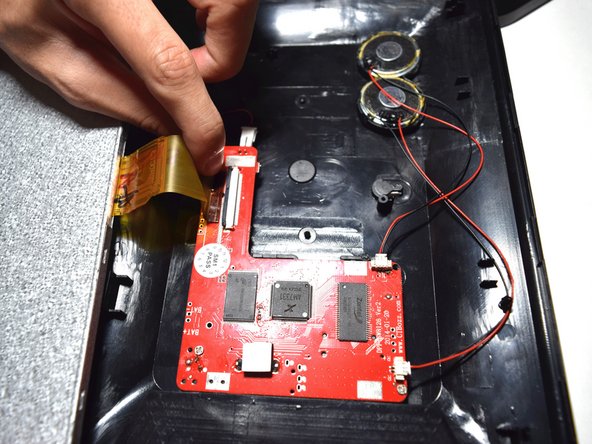
    3. Aluratek ADMPF310F Remote Sensor Replacement: adım 3, 2 resimden 1. Aluratek ADMPF310F Remote Sensor Replacement: adım 3, 2 resimden 2.
      • Using the plastic spudger tool lift the plastic zif(zero instertion force) connector clip up.

      • Pull the ribbon cable away from the motherboard.

      • Be careful as this clip is very frail.

      FixBot'a Sor

      Yorum Ekle

    4. Aluratek ADMPF310F Remote Sensor Replacement: adım 4, 1 resimden 1.
      • Disconnect the red and black cable connecting the screen to the motherboard by just pulling it out.

      FixBot'a Sor

      Yorum Ekle

    1. Aluratek ADMPF310F Remote Sensor Replacement, Remote Sensor: adım 5, 1 resimden 1.
      • Pull out the remote sensor from its holder with your hands.

      • Unsolder the remote sensor from the motherboard.

      FixBot'a Sor

      Yorum Ekle

    2. Aluratek ADMPF310F Remote Sensor Replacement: adım 6, 1 resimden 1.
      • Resolder the the remote sensor back to the motherboard.

      • For more on how to solder check the link here.

      FixBot'a Sor

      Yorum Ekle

Sonuç

To reassemble your device, follow these instructions in reverse order.

İptal et: Bu kılavuzu tamamlamadım.

Pascal Alexis

Üyelik tarihi: 11/05/15

427 İtibar

3 adet Kılavuz yazıldı

Ekip

UMass Dartmouth, Team 5-1, Martin Fall 2016 UMass Dartmouth, Team 5-1, Martin Fall 2016 üyesi

UMASSD-MARTIN-F16S5G1

3 Üyeler

15 adet Kılavuz yazıldı

0Kılavuz Yorumları

Yorum Ekle

İstatistikleri Görüntüle:

Son 24 Saat: 0

Son 7 gün: 4

Son 30 gün: 22

Her zaman: 465