Bu çeviri bir makine tarafından oluşturulmuştur ve henüz bir kişi tarafından incelenmemiştir. Bu dili konuşuyor musunuz? İnceleme için.
Neye ihtiyacın var
-
-
-
Manyetik kulak yastıklarını kulaklıktan nazikçe çekerek çıkarın. Mikrofonu barındıran sol kulak yastığını çıkarmamaya dikkat edin ve yalnızca sağ kulak yastığını çıkardığınızdan emin olun.
 FixBot'a Sor
-
-
-
Açma aletini mikrofon olmayan taraftaki siyah plastik ile köpük ped arasına sıkıştırın ve ardından hoparlörün üzerini kapatan keçe pedleri çıkarmak için yukarı doğru kanırtarak ayırın.
-
-
-
-
Hoparlör modülünü cihazdan yukarı doğru kaldırarak ayırın.
-
-
-
-
-
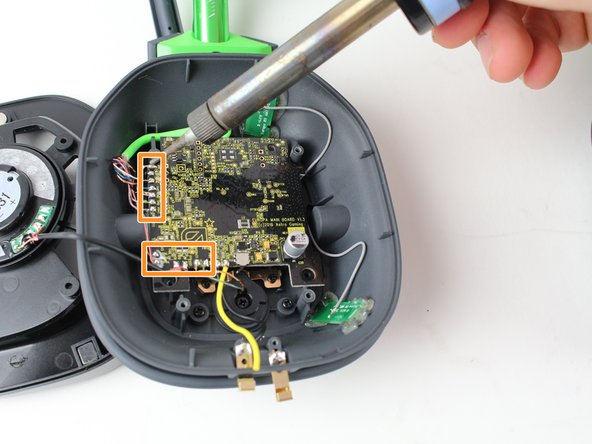
Cihazın alt kısmına yakın iki metal plakadaki siyah ve sarı kabloları lehiminden ayırmak için bir havya kullanın.
-
Kulaklık anakartının sol ve alt kenarları boyunca sıralanan 13 kabloyu lehiminden ayırmak için bir havya kullanın.
-
-
-
Gri kabloların üzerini kaplayan siyah bandı açma aleti ile dikkatlice ayırın
-
-
-
Anakartı kulaklıktan dışarı kaldırın ve gri kabloları anakarttan nazikçe ayırın.
-




Cihazınızı tekrar monte etmek için bu talimatları ters sırayla uygulayın.
İptal et: Bu kılavuzu tamamlamadım.
3 farklı kişi bu kılavuzu tamamladı.

Ekip

Cal Poly, Team S15-G1, Livingston Fall 2017 Cal Poly, Team S15-G1, Livingston Fall 2017 üyesi
CPSU-LIVINGSTON-F17S15G1
3 Üyeler
23 adet Kılavuz yazıldı
2Kılavuz Yorumları
Any chance I could get the E250336. USB board part from you guys? I need one.
I am having a very tough time finding this Part online. Thanks!
