Ana içeriğe geç
Onarım Topluluğuna Katılın - Hesap Oluşturun

Asus ZenBook UX303U Battery Replacement

Neye ihtiyacın var

    1. Asus ZenBook UX303U Battery Replacement, Back Panel: adım 1, 1 resimden 1.
      • Remove the two round rubber feet at the hinge-edge of the laptop.

      FixBot'a Sor

      Yorum Ekle

    2. Asus ZenBook UX303U Battery Replacement: adım 2, 1 resimden 1.
      • Remove the eleven 4 mm Phillips #00 screws from the back panel.

      FixBot'a Sor

      Yorum Ekle

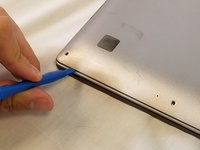
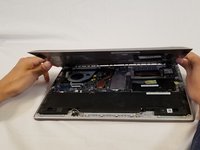
    3. Asus ZenBook UX303U Battery Replacement: adım 3, 2 resimden 1. Asus ZenBook UX303U Battery Replacement: adım 3, 2 resimden 2.
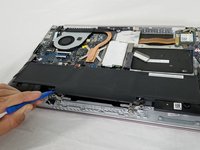
      • Using a plastic opening tool pry the back panel off of the laptop.

      FixBot'a Sor

      Yorum Ekle

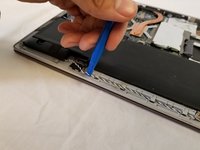
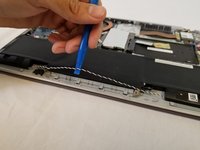
    1. Asus ZenBook UX303U Battery Replacement, Battery: adım 4, 2 resimden 1. Asus ZenBook UX303U Battery Replacement, Battery: adım 4, 2 resimden 2.
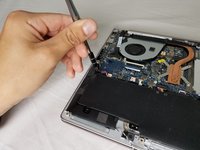
      • Pull the speaker cable out of its four retaining clips with either your fingers, or a plastic opening tool.

      FixBot'a Sor

      Yorum Ekle

    2. Asus ZenBook UX303U Battery Replacement: adım 5, 2 resimden 1. Asus ZenBook UX303U Battery Replacement: adım 5, 2 resimden 2.
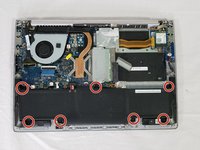
      • Remove all seven 2 mm Phillips #00 screws from the battery.

      FixBot'a Sor

      Yorum Ekle

    3. Asus ZenBook UX303U Battery Replacement: adım 6, 2 resimden 1. Asus ZenBook UX303U Battery Replacement: adım 6, 2 resimden 2.
      • Pull the speaker connector toward the edge of the laptop to disconnect it from its socket.

      FixBot'a Sor

      Yorum Ekle

    4. Asus ZenBook UX303U Battery Replacement: adım 7, 2 resimden 1. Asus ZenBook UX303U Battery Replacement: adım 7, 2 resimden 2.
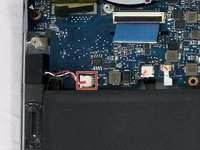
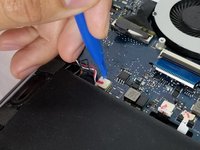
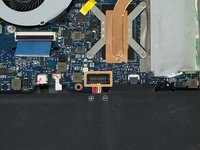
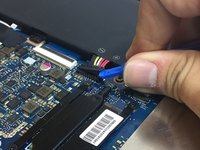
      • Lift the battery connector straight up off its socket to disconnect it from the motherboard.

      • Do not pry on the socket itself or you risk damaging the motherboard.

      FixBot'a Sor

      Yorum Ekle

    5. Asus ZenBook UX303U Battery Replacement: adım 8, 2 resimden 1. Asus ZenBook UX303U Battery Replacement: adım 8, 2 resimden 2.
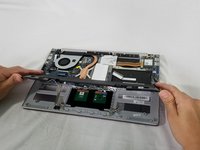
      • Lift the battery and speakers up and pull out to remove.

      • Check underneath the battery for the wire assembly connecting the touchpad to the motherboard. This connection may stick to the underside of the battery. Be careful not to damage it when removing the battery.

      FixBot'a Sor

      Yorum Ekle

    6. Asus ZenBook UX303U Battery Replacement: adım 9, 1 resimden 1.
      • Remove the speakers from the old battery.

      FixBot'a Sor

      Yorum Ekle

Sonuç

To reassemble your device, follow these instructions in reverse order.

Take your e-waste to an R2 or e-Stewards certified recycler.

İptal et: Bu kılavuzu tamamlamadım.

19 farklı kişi bu kılavuzu tamamladı.

Dean Anderson

Üyelik tarihi: 02/14/18

701 İtibar

3 adet Kılavuz yazıldı

Ekip

USF Tampa, Team S3-G5, Nance Spring 2018 USF Tampa, Team S3-G5, Nance Spring 2018 üyesi

USFT-NANCE-S18S3G5

3 Üyeler

45 adet Kılavuz yazıldı

11Kılavuz Yorumları

hello where I can buy a UX303U battery for asus?

jeannette dreifus - Yanıt Paylaş

hello! Where I can buy a UX303U battery for my Asus netbook?

thanks

jeannette dreifus - Yanıt Paylaş

There are two screws holding the back panel in place. They are located below the two rubber pads at the back of the pc. They must be removed in order to open the back panel.

Dave Man - Yanıt Paylaş

Just gone through this, but two problems surfaced. 1 it won’t connect to our usual WiFi router and can’t figure out why. Is it possible to damage the WiFi connectivity when removing battery? 2 there’s no indication of charge levels. It says 100% and doesn’t change. Thoughts?

Barny Harper - Yanıt Paylaş

Take all that back. Went back in and battery connector hadn’t clicked in far enough. Seems to be working fine now.

Barny Harper - Yanıt Paylaş

Yorum Ekle

İstatistikleri Görüntüle:

Son 24 Saat: 4

Son 7 gün: 31

Son 30 gün: 107

Her zaman: 33,405