Giriş
Use this guide to replace a broken battery. Your battery may be broken if your computer will only turn on when it is connected to the charger, but please refer to our Troubleshooting Guide for more information.
Neye ihtiyacın var
-
-
-
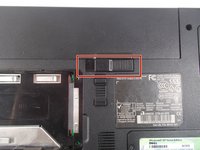
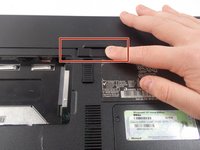
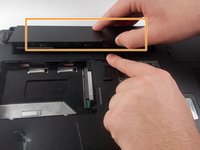
Remove the battery by flipping the two switches under the battery and pulling it out
 FixBot'a Sor
-
-
-
-
Push the tab from the battery, downwards to unlock the battery.
-
The tab should be in the position next to the unlocked indicator.
-
-
-
Now, push the other tab (the one right under the battery) from right to left.
-
Now the battery will be loose; lift the battery up and out of the computer.
-
-


To reassemble your device, follow these instructions in reverse order.
İptal et: Bu kılavuzu tamamlamadım.
Bir başkası bu kılavuzu tamamladı.

Ekip

UMass Dartmouth, Team 1-8, Catania Fall 2016 UMass Dartmouth, Team 1-8, Catania Fall 2016 üyesi
UMASSD-CATANIA-F16S1G8
3 Üyeler
45 adet Kılavuz yazıldı
