Ana içeriğe geç
Onarım Topluluğuna Katılın - Hesap Oluşturun

Dell Latitude E6400 WiFi Card Replacement

Neye ihtiyacın var

    1. Dell Latitude E6400 WiFi Card Replacement, WiFi Card: adım 1, 2 resimden 1. Dell Latitude E6400 WiFi Card Replacement, WiFi Card: adım 1, 2 resimden 2.
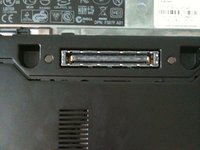
      • Simultaneously slide the battery latches (outlined by the red box) to the dock connector in the middle.

      • This will release the battery. Just slide the battery away from the computer.

      • Open up the computer and press and hold the power button for 5 seconds. This drains any power left inside the computer.

      • This is important, as if electricity remains in the notebook, it can shock you and damage the logic board.

      FixBot'a Sor

      Yorum Ekle

    2. Dell Latitude E6400 WiFi Card Replacement: adım 2, 2 resimden 1. Dell Latitude E6400 WiFi Card Replacement: adım 2, 2 resimden 2.
      • Loosen the center screw with a philips screw driver. This is the only screw that needs to be loosened.

      • It can't be removed as it is captive the the bottom plate.

      • Now slide the plate away from the dock connector.

      FixBot'a Sor

      Yorum Ekle

    3. Dell Latitude E6400 WiFi Card Replacement: adım 3, 2 resimden 1. Dell Latitude E6400 WiFi Card Replacement: adım 3, 2 resimden 2.
      • Use a plastic opening tool or a spudger to remove the antennas.

      • I use my fingers, but the picture shows and iPod opening tool because most adults have bigger fingers.

      • I'm 14, so my fingers are small enough.

      • Some E6400 models have a card with three connections-a gray wire in the middle-marked appropriately.

      FixBot'a Sor

      Yorum Ekle

    4. Dell Latitude E6400 WiFi Card Replacement: adım 4, 1 resimden 1.
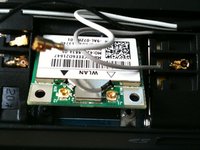
      • remove the one and only philips screw securing the WiFi card in place.

      FixBot'a Sor

      Yorum Ekle

    5. Dell Latitude E6400 WiFi Card Replacement: adım 5, 2 resimden 1. Dell Latitude E6400 WiFi Card Replacement: adım 5, 2 resimden 2.
      • The card should instantly pop to an angle less than 45 degrees once the screw is removed.

      • Now simply pull the card strait away from the slot.

      • Install a new card by sliding it in the direction of the arrow and pressing firmly down until it clicks.

      FixBot'a Sor

      Yorum Ekle

    6. Dell Latitude E6400 WiFi Card Replacement: adım 6, 2 resimden 1. Dell Latitude E6400 WiFi Card Replacement: adım 6, 2 resimden 2.
      • Slide the bottom plate on.

      • Slide it to the rear of the notebook. (battery compartment)

      • Tighten the screw.

      • Do not over-tighten. Doing so will strip the screw.

      FixBot'a Sor

      Yorum Ekle

    7. Dell Latitude E6400 WiFi Card Replacement: adım 7, 2 resimden 1. Dell Latitude E6400 WiFi Card Replacement: adım 7, 2 resimden 2.
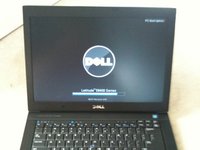
      • Slide the battery in until it clicks.

      • Press the power button.

      • AND it works.

      FixBot'a Sor

      Yorum Ekle

Sonuç

To reassemble your device, follow these instructions in reverse order.

İptal et: Bu kılavuzu tamamlamadım.

12 farklı kişi bu kılavuzu tamamladı.
Nicholas Ouimet

Üyelik tarihi: 10/16/09

3.730 İtibar

11 adet Kılavuz yazıldı

1Rehber Yorum

Why is your soundcloud linked as the wifi card site. It is really not appropriate considering how great of a job you did with the instructions for this repair.

Sean Brewer - Yanıt Paylaş

Yorum Ekle

İstatistikleri Görüntüle:

Son 24 Saat: 4

Son 7 gün: 33

Son 30 gün: 65

Her zaman: 29,483