Ana içeriğe geç
Onarım Topluluğuna Katılın - Hesap Oluşturun

Dyson V8 Animal Battery Replacement

Neye ihtiyacın var

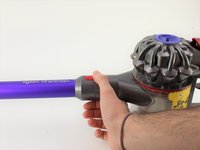
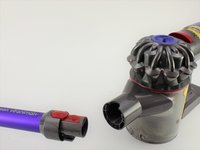
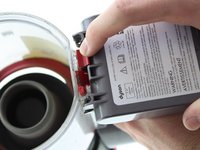
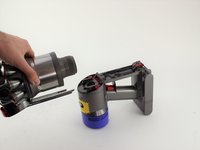
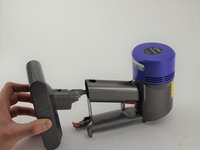
    1. Dyson V8 Animal Battery Replacement, Bin: adım 1, 2 resimden 1. Dyson V8 Animal Battery Replacement, Bin: adım 1, 2 resimden 2.
      • Push the red button and slide the connecting shaft off.

      • The shaft must be held from moving when disconnecting from the motor.

      FixBot'a Sor
      Yorum Ekle

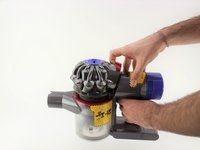
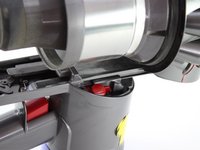
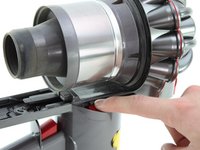
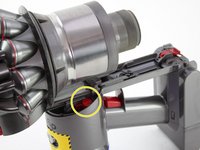
    2. Dyson V8 Animal Battery Replacement: adım 2, 3 resimden 1. Dyson V8 Animal Battery Replacement: adım 2, 3 resimden 2. Dyson V8 Animal Battery Replacement: adım 2, 3 resimden 3.
      • Pull up on the red tab and continue to slide the motor completely up.

      • The dust bin will open on the bottom.

      FixBot'a Sor

      Yorum Ekle

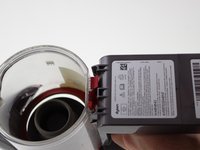
    3. Dyson V8 Animal Battery Replacement: adım 3, 2 resimden 1. Dyson V8 Animal Battery Replacement: adım 3, 2 resimden 2.
      • Push the red tab down.

      • Pull the dust bin out from the handle head.

      FixBot'a Sor

      Yorum Ekle

    1. Dyson V8 Animal Battery Replacement, Battery: adım 4, 2 resimden 1. Dyson V8 Animal Battery Replacement, Battery: adım 4, 2 resimden 2.
      • Push down on the red tab.

      FixBot'a Sor

      Yorum Ekle

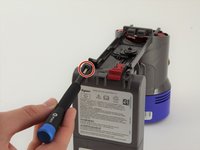
    2. Dyson V8 Animal Battery Replacement: adım 5, 2 resimden 1. Dyson V8 Animal Battery Replacement: adım 5, 2 resimden 2.
      • Push down on the red tab on the other side.

      • Pull the motor away from the handle.

      • You may need to hold down the handle while sliding the motor off.

      FixBot'a Sor

      Yorum Ekle

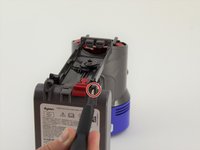
    3. Dyson V8 Animal Battery Replacement: adım 6, 2 resimden 1. Dyson V8 Animal Battery Replacement: adım 6, 2 resimden 2.
      • Use a Phillips #0 screwdriver to remove two 18 mm screws on the bottom of the battery.

      FixBot'a Sor

      Yorum Ekle

    4. Dyson V8 Animal Battery Replacement: adım 7, 1 resimden 1.
      • Use a Phillips #0 screwdriver to remove one 18 mm screw on the back of the handle.

      FixBot'a Sor

      Yorum Ekle

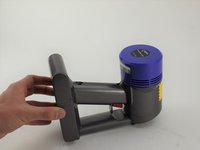
    5. Dyson V8 Animal Battery Replacement: adım 8, 2 resimden 1. Dyson V8 Animal Battery Replacement: adım 8, 2 resimden 2.
      • Slide the battery out from handle.

      • The handle must be held from moving while sliding the battery out.

      FixBot'a Sor

      Yorum Ekle

Sonuç

To reassemble your device, follow these instructions in reverse order.

İptal et: Bu kılavuzu tamamlamadım.

20 farklı kişi bu kılavuzu tamamladı.

AJ McLean-Scholz

Üyelik tarihi: 01/23/20

888 İtibar

5 adet Kılavuz yazıldı

Ekip

Cal Poly, Team S19-G1, White Winter 2020 Cal Poly, Team S19-G1, White Winter 2020 üyesi

CPSU-WHITE-W20S19G1

4 Üyeler

18 adet Kılavuz yazıldı

9Kılavuz Yorumları

Replacement Vacuum Cleaner Batteries for Dyson V8 Animal

Battery Type:   Li-ion

Voltage:   21.6V

Capacity:   4000mAh

Color:   Grey

Weight:   770.26g

Dimensions: 145.00 x 90.10 x 115.90mm

If you intereted in this battery, please view more info on http://www.drillbattery.com.au/orderbatt...

Drillbatterycomau - Yanıt Paylaş

Thankyou! I'll be able to replace the battery soon.

Olivia Swift - Yanıt Paylaş

This worked for the V7 Animal model just fine. Very easy and clear, thank you!

Katie - Yanıt Paylaş

Thank you. These instructions just helped me to replace the worn out battery on our V8 Animal in 5 minutes! Now it's humming along again with 3 blue bars. Great! (Note: I was concerned I might strip the screw head but I just pressed harder while turning and the screwdriver did not slip. Then I saw that the replacement battery came with four new replacement screws. So, it's all good.)

Neill Graham - Yanıt Paylaş

I have a stripped screw that won't extract. I have already drilled the hole ho so now no screwdriver will work. Any suggestions?

christina - Yanıt Paylaş

Yorum Ekle

İstatistikleri Görüntüle:

Son 24 Saat: 10

Son 7 gün: 65

Son 30 gün: 350

Her zaman: 13,816