Bu çeviri bir makine tarafından oluşturulmuştur ve henüz bir kişi tarafından incelenmemiştir. Bu dili konuşuyor musunuz? İnceleme için.
Giriş
Bu kılavuz, JBL Clip 4 Hoparlörünüzün anakartını çıkarmanıza yardımcı olacaktır. Bazen, Clip 4'ün Bluetooth bağlantısı çalışmadığında, Bluetooth anakart üzerinde bulunduğu için sorun anakarttan kaynaklanır; bu nedenle arızalı bir anakart bağlantıyı bozabilir ve hatta hoparlörün düzgün çalışmasını engelleyebilir.
Neye ihtiyacın var
-
-
-
Ön ızgarayı ayırmak için bir alet edinin; ideal olanı iFixit aletlerinden birini kullanmaktır. Ön ızgara cihaza yapıştırılmış olduğundan bu gereklidir.
 FixBot'a Sor
-
-
-
Artık tek yapmanız gereken seçtiğiniz aleti kullanarak dikkatlice ayırmak; böylece ön ızgara cihazdan kolayca ayrılacaktır. Ön ızgarayı çıkardıktan sonra cihazınız bu şekilde görünmelidir.
-
-
-
-
-
Öncelikle, cihazın kenarındaki 5 adet 6 mm'lik yıldız vidayı sökmeniz gerekir.
-
-
-
-
Artık vidaları sökülmüş ön ve arka muhafaza ile, ikisi arasında bağlantı kuran bazı kabloları görebiliyor olmalısınız. Bu kabloları yerinden çıkarmanız yeterlidir; arka muhafaza ön kısımdan ayrılacaktır.
-
-
-
-
-
Batarya anakarta bağlanır ve anakarta bağlanan bir kablosu bulunan siyah kutu şeklindeki parçanın içindedir. Bataryayı anakarta bağlayan kabloyu çıkarmanız gerekir.
-
-
-
Artık tek yapmanız gereken bataryayı bulunduğu yuvadan çekerek çıkarmaktır; böylece bataryayı cihazdan başarıyla ayırmış olursunuz.
-
-
-
-
-
Artık anakartı cihaza bağlayan bu dört adet 3 mm Phillips vidayı sökmeniz gerekiyor.
-
-
-
Bu noktada, anakartı çekip çıkarmanız yeterlidir; artık yenisiyle değiştirebilirsiniz.
-
-


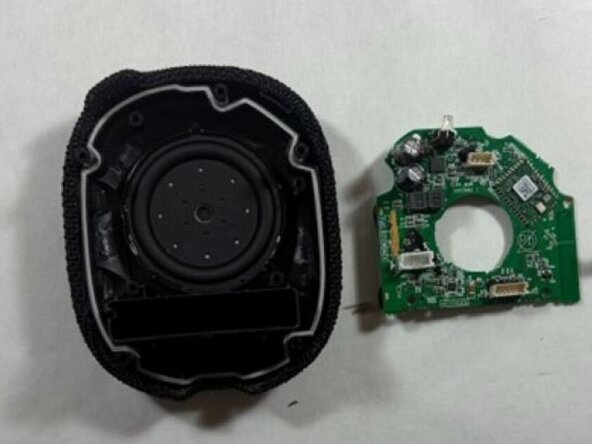
Cihazınızı yeniden toplamak için bu talimatları ters sırayla uygulayın. Elektronik atıklarınızı R2 veya e-Stewards sertifikalı bir geri dönüşüm tesisine götürün.

Ekip

UMass Dartmouth, Team 3-4, Shaddix Spring 2026 UMass Dartmouth, Team 3-4, Shaddix Spring 2026 üyesi
UMASSD-SHADDIX-S26S3G4
4 Üyeler
84 adet Kılavuz yazıldı
