Ana içeriğe geç
Onarım Topluluğuna Katılın - Hesap Oluşturun

LG CF360 Front Speaker Replacement

Neye ihtiyacın var

  1. LG CF360 Front Speaker Replacement, Battery: adım 1, 2 resimden 1. LG CF360 Front Speaker Replacement, Battery: adım 1, 2 resimden 2.
    • On the back of the phone, place your thumb on the three raised bumps and slide the back cover upward.

    FixBot'a Sor

    Yorum Ekle

  2. LG CF360 Front Speaker Replacement: adım 2, 1 resimden 1.
    • Lift and remove the battery.

    FixBot'a Sor

    Yorum Ekle

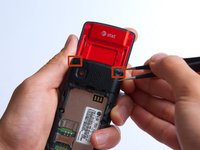
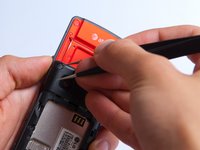
  3. LG CF360 Front Speaker Replacement, Back Cover: adım 3, 2 resimden 1. LG CF360 Front Speaker Replacement, Back Cover: adım 3, 2 resimden 2.
    Bu adımda kullanılan alet:
    Tweezers
    $4.99
    • Remove the two screw covers at the top of phone with tweezers.

    FixBot'a Sor

    Yorum Ekle

  4. LG CF360 Front Speaker Replacement: adım 4, 1 resimden 1.
    • Remove the six Phillips #000 (3mm) screws.

    FixBot'a Sor

    Yorum Ekle

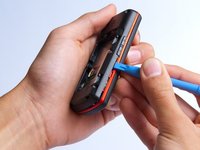
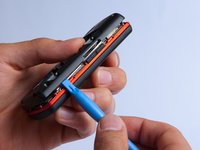
  5. LG CF360 Front Speaker Replacement: adım 5, 3 resimden 1. LG CF360 Front Speaker Replacement: adım 5, 3 resimden 2. LG CF360 Front Speaker Replacement: adım 5, 3 resimden 3.
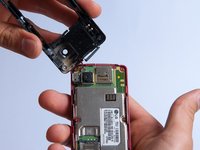
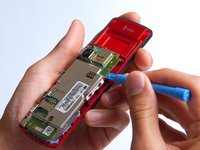
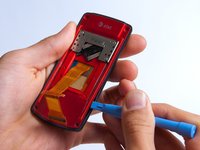
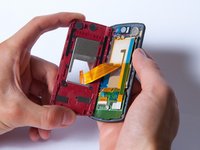
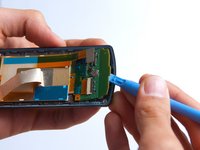
    • Use the plastic opening tool to pry the back cover off. Insert the tool between the back cover and red mid section and go around the entire phone.

    • The plastic side buttons fall out when you take the back cover off.

    • The back cover is connected to the speaker by red and black wires.

    FixBot'a Sor

    Yorum Ekle

  6. LG CF360 Front Speaker Replacement: adım 6, 1 resimden 1.
    • Use the tweezers to remove the red and black wires connecting the speaker to the green motherboard by pinching the sides of the plastic base near the motherboard.

    • Set the back cover with the speaker aside.

    FixBot'a Sor

    Yorum Ekle

  7. LG CF360 Front Speaker Replacement, Motherboard: adım 7, 2 resimden 1. LG CF360 Front Speaker Replacement, Motherboard: adım 7, 2 resimden 2.
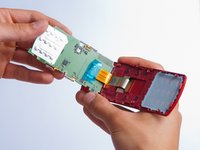
    • Use the plastic opening tool to gently lift the snapped-in motherboard from the front panel.

    • An orange ribbon from the LCD is connected to the underside of the motherboard, so do not force the motherboard from the rest of the phone yet.

    FixBot'a Sor

    Yorum Ekle

  8. LG CF360 Front Speaker Replacement: adım 8, 1 resimden 1.
    • Gently remove the blue transparent tape from the connector.

    FixBot'a Sor

    Yorum Ekle

  9. LG CF360 Front Speaker Replacement: adım 9, 1 resimden 1.
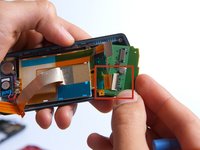
    • With the plastic opening tool, gently pry the LCD connector from the motherboard.

    • Set the motherboard aside.

    FixBot'a Sor

    Yorum Ekle

  10. LG CF360 Front Speaker Replacement, Front Case: adım 10, 1 resimden 1.
    • Take the front case and unscrew the four Phillips #000 (1mm) screws around the ribbon.

    FixBot'a Sor

    Yorum Ekle

  11. LG CF360 Front Speaker Replacement: adım 11, 1 resimden 1.
    • Gently pull the orange ribbon from the number pad casing.

    • Set the number pad case to the side once it is detached from the ribbon.

    FixBot'a Sor

    Yorum Ekle

  12. LG CF360 Front Speaker Replacement: adım 12, 1 resimden 1.
    Bu adımda kullanılan alet:
    Tweezers
    $4.99
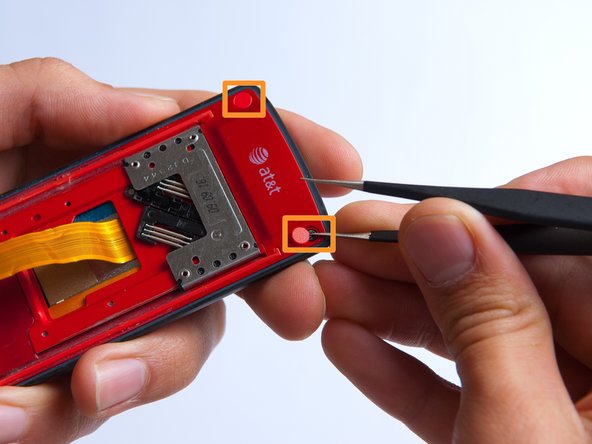
    • Remove the two red sticker screw coverings at the top corners with tweezers.

    FixBot'a Sor

    Yorum Ekle

  13. LG CF360 Front Speaker Replacement: adım 13, 1 resimden 1.
    • Unscrew the four Phillips #000 (3mm) screws at the corners of the phone.

    FixBot'a Sor

    Yorum Ekle

  14. LG CF360 Front Speaker Replacement: adım 14, 2 resimden 1. LG CF360 Front Speaker Replacement: adım 14, 2 resimden 2.
    • Pry the red sliding backing from the front cover by inserting the plastic opening tool in between the two sections and going around the entire phone.

    • Set the red sliding backing and front cover to the side.

    FixBot'a Sor

    Yorum Ekle

  15. LG CF360 Front Speaker Replacement, Front Speaker: adım 15, 1 resimden 1.
    • Be very careful to not damage the keypad board when using the plastic opening tool.

    • Gently pry the LCD ribbon from the left side of the front cover using the plastic opening tool.

    • One LCD ribbon is still connected to the keyboard, so do not attempt to remove it from the front cover.

    FixBot'a Sor

    Yorum Ekle

  16. LG CF360 Front Speaker Replacement: adım 16, 2 resimden 1. LG CF360 Front Speaker Replacement: adım 16, 2 resimden 2.
    • Use the plastic opening tool to partially lift up the keyboard from the front of the phone.

    • Slowly rotate the keyboard clockwise while pulling it to the right to disconnect the second LCD ribbon from the keyboard.

    • Remove the keyboard from the phone and set aside.

    FixBot'a Sor

    Yorum Ekle

  17. LG CF360 Front Speaker Replacement: adım 17, 1 resimden 1.
    • Do not attempt to completely remove the speaker from the phone at this point - it is still connected to the LCD screen.

    • Use the plastic opening tool to pry the front speaker from the phone.

    FixBot'a Sor

    Yorum Ekle

  18. LG CF360 Front Speaker Replacement: adım 18, 2 resimden 1. LG CF360 Front Speaker Replacement: adım 18, 2 resimden 2.
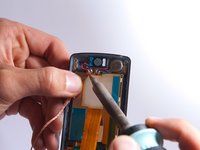
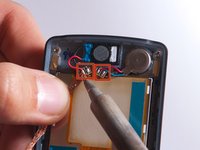
    • Use a soldering iron to desolder the lead junctions. If you have never used a soldering iron or you need a refresher, check out iFixit's soldering guide.

    • Separate the speaker from the LCD screen.

    FixBot'a Sor

    Yorum Ekle

Sonuç

To reassemble your device, follow these instructions in reverse order.

İptal et: Bu kılavuzu tamamlamadım.

2 farklı kişi bu kılavuzu tamamladı.

Annie White

Üyelik tarihi: 10/18/13

265 İtibar

2 adet Kılavuz yazıldı

Ekip

Cal Poly, Team 4-27, Amido Fall 2013 Cal Poly, Team 4-27, Amido Fall 2013 üyesi

CPSU-AMIDO-F13S4G27

4 Üyeler

27 adet Kılavuz yazıldı

0Kılavuz Yorumları

Yorum Ekle

İstatistikleri Görüntüle:

Son 24 Saat: 0

Son 7 gün: 1

Son 30 gün: 23

Her zaman: 655