Giriş
If you have a bad motherboard or are using it for parts this guide with show you how to retrieve the motherboard from your LG Fortune phone.
Neye ihtiyacın var
-
-
-
Use the slit on the bottom right side of the phone to open the back cover of your phone.
-
Slowly pry the back cover off the phone starting from the bottom up to the top.
 FixBot'a Sor
-
-
-
Use the slot in the middle of the bottom edge of the battery to pry it up and out of the case.
-
-
-
-
-
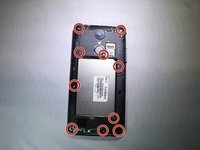
Using a PH000 screwdriver, remove the ten 4mm screws on the back panelling.
-
Remove the back panelling from the device with your fingers or a spudger.
-
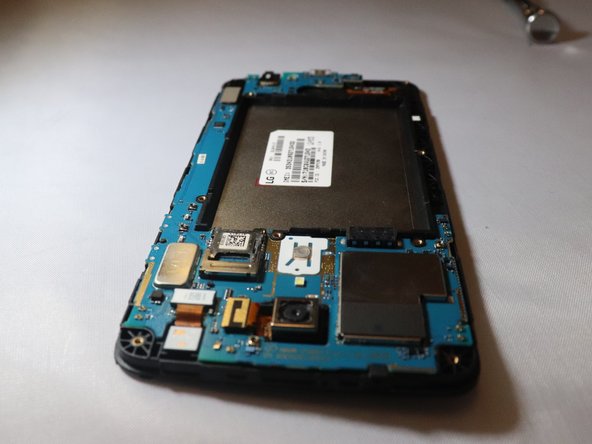
Work slowly side to side to release this back casing and expose the motherboard.
-
-
-
-
Place a spudger or an opening tool under the edge of the video card press connector and pry straight up to disconnect it from the motherboard.
-
-
-
Unplug the front facing camera press fit connector from the motherboard by prying upwards with a spudger or plastic opening tool.
-
-
-
Unplug the rear facing camera ribbon cable from the motherboard by prying up the press fit connector with a spudger.
-
-
-
Use the spudger to pry off the motherboard from the rest of the device on the top left corner down to the bottom right corner
-
-





To reassemble your device, follow these instructions in reverse order. Take your e-waste to an R2 or e-Stewards certified recycler.

Ekip

Eastern Washington University, Team S1-G5, Rowley Spring 2019 Eastern Washington University, Team S1-G5, Rowley Spring 2019 üyesi
EWU-ROWLEY-S19S1G5
3 Üyeler
35 adet Kılavuz yazıldı
