Giriş
Use this guide to replace the battery in your LG K30.
If your battery is swollen, take appropriate precautions.
This guide instructs you to remove the back panel assembly; this is intended to prevent damage to the display cables. If you feel comfortable supporting the display carefully while peeling the battery out of the LG K30, you can skip the display removal and go directly to the battery removal steps.
For optimal performance, after completing this guide, calibrate your newly installed battery: Charge it to 100% and keep charging it for at least two more hours. Then use your LG K30 until it shuts off due to low battery. Finally, charge it uninterrupted to 100%.
Neye ihtiyacın var
-
-
-
Power off your Phone before beginning disassembly.
-
Use the 'Jimmy' and 'Metal Spudger' to slowly pry open the outsides of the back case.
 FixBot'a Sor
-
-
-
Remove the thirteen 3.4 mm Phillips #00 screws securing the midframe to the display assembly.
-
-
-
-
Use a metal spudger or plastic opening tool to pry open the outer cover.
-
-
-
Use the flat end of a spudger to detach the battery connector from the logic board.
-
-


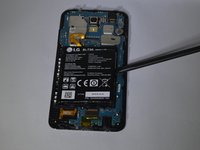
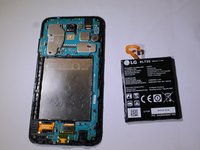
To reassemble your device, follow these instructions in reverse order.
İptal et: Bu kılavuzu tamamlamadım.
12 farklı kişi bu kılavuzu tamamladı.

Ekip

Purdue University Northwest, Team S2-G1, Hingst Spring 2019 Purdue University Northwest, Team S2-G1, Hingst Spring 2019 üyesi
PNW-HINGST-S19S2G1
4 Üyeler
35 adet Kılavuz yazıldı
