Ana içeriğe geç
Onarım Topluluğuna Katılın - Hesap Oluşturun

Motorola Moto G4 Plus Volume Buttons Replacement

Neye ihtiyacın var

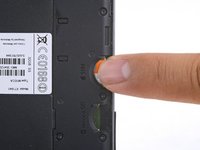
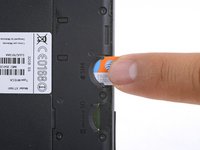
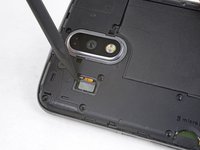
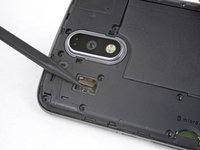
  1. Motorola Moto G4 Plus Volume Buttons Replacement, SIM Card: adım 1, 2 resimden 1. Motorola Moto G4 Plus Volume Buttons Replacement, SIM Card: adım 1, 2 resimden 2.
    • Insert a fingernail or a spudger into the notch on bottom edge of the phone near the charging port.

    • Pry the back cover away from the body of the phone.

    FixBot'a Sor

    Yorum Ekle

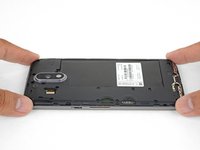
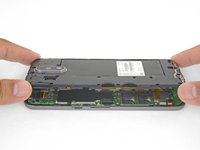
  2. Motorola Moto G4 Plus Volume Buttons Replacement: adım 2, 3 resimden 1. Motorola Moto G4 Plus Volume Buttons Replacement: adım 2, 3 resimden 2. Motorola Moto G4 Plus Volume Buttons Replacement: adım 2, 3 resimden 3.
    • Continue to gently lift the back cover until all plastic clips have been released.

    • Remove the back cover.

    • To reinstall the back cover, align the cover over the body and gently press all around the edges until you feel the clips snap into place.

    FixBot'a Sor

    Yorum Ekle

  3. Motorola Moto G4 Plus Volume Buttons Replacement: adım 3, 2 resimden 1. Motorola Moto G4 Plus Volume Buttons Replacement: adım 3, 2 resimden 2.
    • Slide out and remove the SIM card.

    FixBot'a Sor

    Yorum Ekle

  4. Motorola Moto G4 Plus Volume Buttons Replacement, Battery: adım 4, 1 resimden 1.
    • Remove the nineteen 3.1 mm T3 screws securing the midframe.

    FixBot'a Sor

    Yorum Ekle

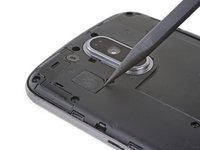
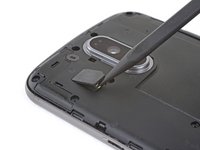
  5. Motorola Moto G4 Plus Volume Buttons Replacement: adım 5, 2 resimden 1. Motorola Moto G4 Plus Volume Buttons Replacement: adım 5, 2 resimden 2.
    • Use the point of a spudger to pry up the rubber cover over the camera flash connector.

    • Remove the rubber cover.

    FixBot'a Sor

    Yorum Ekle

  6. Motorola Moto G4 Plus Volume Buttons Replacement: adım 6, 2 resimden 1. Motorola Moto G4 Plus Volume Buttons Replacement: adım 6, 2 resimden 2.
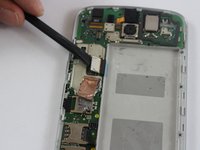
    • Use the point of a spudger to pry up and disconnect the camera flash connector.

    FixBot'a Sor

    Yorum Ekle

  7. Motorola Moto G4 Plus Volume Buttons Replacement: adım 7, 3 resimden 1. Motorola Moto G4 Plus Volume Buttons Replacement: adım 7, 3 resimden 2. Motorola Moto G4 Plus Volume Buttons Replacement: adım 7, 3 resimden 3.
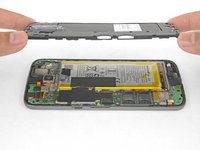
    • Loosen the midframe along the edges and lift it away from the body.

    • Remove the midframe.

    FixBot'a Sor

    Yorum Ekle

  8. Motorola Moto G4 Plus Volume Buttons Replacement: adım 8, 2 resimden 1. Motorola Moto G4 Plus Volume Buttons Replacement: adım 8, 2 resimden 2.
    • Be very careful not to puncture the battery with any sharp tools. A damaged lithium-ion battery can catch fire and/or explode.

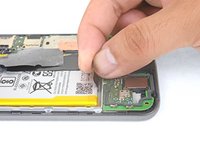
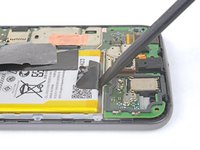
    • Peel up and remove the tape securing the battery wires.

    • Peel up and remove the black tape that bridges the battery and the phone.

    • While neither tape pieces are necessary for the operation of the phone, save them if they are in good condition for the reinstallation process.

    FixBot'a Sor

    Yorum Ekle

  9. Motorola Moto G4 Plus Volume Buttons Replacement: adım 9, 2 resimden 1. Motorola Moto G4 Plus Volume Buttons Replacement: adım 9, 2 resimden 2.
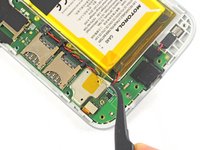
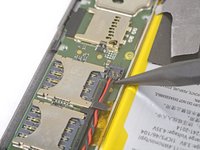
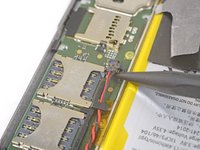
    • Slip the point of a spudger underneath the red and black battery wires and gently pry straight up.

    • Do not pull the plug out, or you will tear the board socket out. Be careful where you pry. Do not pry against the board socket.

    • During reassembly, align the connector in its socket, then press straight down to reconnect it.

    FixBot'a Sor

    Yorum Ekle

  10. Motorola Moto G4 Plus Volume Buttons Replacement: adım 10, 2 resimden 1. Motorola Moto G4 Plus Volume Buttons Replacement: adım 10, 2 resimden 2.
    Bu adımda kullanılan alet:
    Tweezers
    $4.99
    • Use tweezers or your fingers to de-route the battery wires from the plastic brackets.

    FixBot'a Sor

    Yorum Ekle

  11. Motorola Moto G4 Plus Volume Buttons Replacement: adım 11, 3 resimden 1. Motorola Moto G4 Plus Volume Buttons Replacement: adım 11, 3 resimden 2. Motorola Moto G4 Plus Volume Buttons Replacement: adım 11, 3 resimden 3.
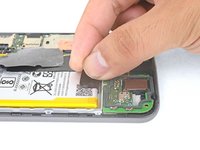
    • Peel the black pull tab from battery and pull slowly but firmly to separate the battery from the frame.

    • A few drops of high concentration (90% or higher) isopropyl alcohol along each side may help soften the adhesive.

    • If the pull tab breaks, use a spudger to gently pry around the edges of the battery until it comes loose.

    • Don't deform or puncture the battery—it can catch fire and/or explode if damaged.

    • Never reinstall a damaged or deformed battery. Replace the battery.

    FixBot'a Sor

    Yorum Ekle

  12. Motorola Moto G4 Plus Volume Buttons Replacement: adım 12, 1 resimden 1.
    Bu adımda kullanılan alet:
    Tesa 61395 Tape
    $8.95
    • Remove the battery.

    • To install a battery, orient the new battery such that the wires exit near the bottom of the phone, and the battery connector is on the motherboard side.

    • Clean off any adhesive residue which may prevent the battery from sitting flush against the frame. Use a few strips of adhesive included in the battery kit or some double-sided tape to secure the battery to the frame.

    FixBot'a Sor

    Yorum Ekle

  13. Motorola Moto G4 Plus Volume Buttons Replacement, Motherboard: adım 13, 2 resimden 1. Motorola Moto G4 Plus Volume Buttons Replacement, Motherboard: adım 13, 2 resimden 2.
    Bu adımda kullanılan alet:
    Tweezers
    $4.99
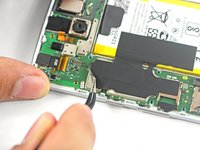
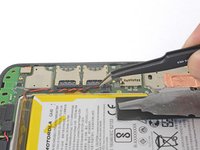
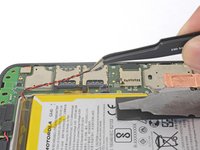
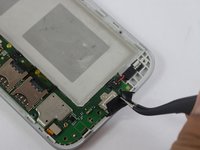
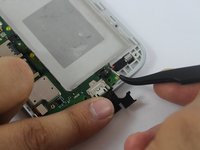
    • Using tweezers, lift up the black silicon piece connecting the motherboard to the front casing.

    • Using tweezers, remove the red and black cable connecting the motherboard to the front casing.

    FixBot'a Sor

    Yorum Ekle

  14. Motorola Moto G4 Plus Volume Buttons Replacement: adım 14, 2 resimden 1. Motorola Moto G4 Plus Volume Buttons Replacement: adım 14, 2 resimden 2.
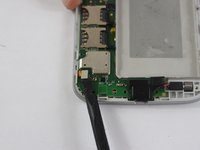
    • Using a spudger, remove the two metal pieces connecting the motherboard to the front casing.

    FixBot'a Sor

    Yorum Ekle

  15. Motorola Moto G4 Plus Volume Buttons Replacement: adım 15, 1 resimden 1.
    • Using tweezers, remove the yellow film connecting the rear camera to the motherboard.

    • The film is connected by an adhesive, so it may take some jostling to remove.

    FixBot'a Sor

    Yorum Ekle

  16. Motorola Moto G4 Plus Volume Buttons Replacement: adım 16, 1 resimden 1.
    • Remove two 4.0 mm T3 Torx screws connecting the motherboard to the front casing.

    FixBot'a Sor

    Yorum Ekle

  17. Motorola Moto G4 Plus Volume Buttons Replacement: adım 17, 1 resimden 1.
    • Using a spudger, lift up and remove the motherboard.

    FixBot'a Sor

    Yorum Ekle

  18. Motorola Moto G4 Plus Volume Buttons Replacement, Volume Buttons: adım 18, 1 resimden 1.
    Bu adımda kullanılan alet:
    Tweezers
    $4.99
    • Using tweezers, remove the volume buttons.

    FixBot'a Sor

    Yorum Ekle

Sonuç

To reassemble your device, follow these instructions in reverse order.

İptal et: Bu kılavuzu tamamlamadım.

3 farklı kişi bu kılavuzu tamamladı.

Sami Taha

Üyelik tarihi: 02/20/17

151 İtibar

1 Kılavuz yazıldı

Ekip

USF Tampa, Team S2-G6, Sullivan Spring 2017 USF Tampa, Team S2-G6, Sullivan Spring 2017 üyesi

USFT-SULLIVAN-S17S2G6

4 Üyeler

20 adet Kılavuz yazıldı

0Kılavuz Yorumları

Yorum Ekle

İstatistikleri Görüntüle:

Son 24 Saat: 3

Son 7 gün: 11

Son 30 gün: 51

Her zaman: 8,140