Giriş
Your New Nintendo 2DS XL's battery may need to be replaced if the device doesn't turn on when you press the power button. The battery is directly accessible under the bottom panel. For more information, refer to our troubleshooting page.
Neye ihtiyacın var
-
-
Before you begin, power off the console and remove:
-
The stylus
-
Any game cartridge
-
The microSD card
 FixBot'a Sor
-
-
-
Use a tri‑point Y00 screwdriver to remove the four 6 mm‑long screws located at the four corners of the bottom panel.
-
-
-
-
Use a spudger to gently pry around the two short edges and front edge (with the stylus cut‑out) to release the clips securing the back cover.
-
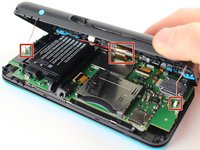
Swing the back cover open from its front edge to release the clips along the hinge edge. Don't remove it fully—three cables are connecting it to the motherboard (two on each side and one in the rear).
-
-
Bu adımda kullanılan alet:Tweezers$4.99
-
Use tweezers to disconnect the two cables that connect the rear buttons on either side to the motherboard by gently pulling them upwards.
-
Fold the back cover over the hinge edge, keeping the cable connected. Don't strain the cable.
-
-
-
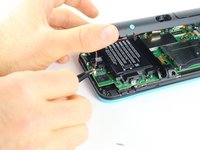
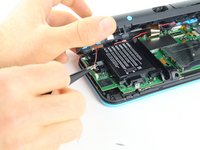
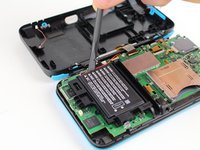
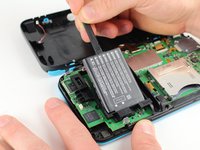
Use the flat end of a spudger to gently pry the battery out of its plastic enclosure.
-






To reassemble your device, follow these instructions in reverse order.
İptal et: Bu kılavuzu tamamlamadım.
49 farklı kişi bu kılavuzu tamamladı.

Ekip

Cal Poly, Team S18-G6, Forte Fall 2017 Cal Poly, Team S18-G6, Forte Fall 2017 üyesi
CPSU-FORTE-F17S18G6
5 Üyeler
24 adet Kılavuz yazıldı
16Kılavuz Yorumları
CTR-003 Battery
Do I need to put a sticky pad on the new battery?
