Ana içeriğe geç
Onarım Topluluğuna Katılın - Hesap Oluşturun

Opening Procedure

Neye ihtiyacın var

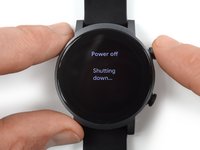
  1. Opening Procedure, Power down your watch: adım 1, 2 resimden 1. Opening Procedure, Power down your watch: adım 1, 2 resimden 2.
    • Before starting repairs, take your watch off the charger and power it down.

    • Remove the watch band.

    FixBot'a Sor

    Yorum Ekle

  2. Opening Procedure, Loosen the adhesive: adım 2, 1 resimden 1.
    • Apply a heated iOpener to the rear side of the watch for 5 minutes to loosen the adhesive underneath.

    • A hair dryer, heat gun, or hot plate may also be used, but be careful not to overheat the device.

    FixBot'a Sor

    Yorum Ekle

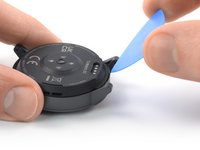
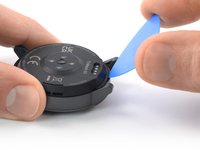
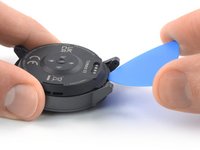
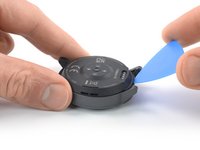
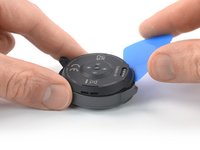
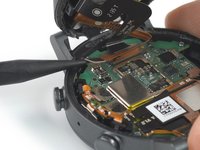
  3. Opening Procedure, Insert an opening pick: adım 3, 3 resimden 1. Opening Procedure, Insert an opening pick: adım 3, 3 resimden 2. Opening Procedure, Insert an opening pick: adım 3, 3 resimden 3.
    • Insert an opening pick into the recess between the watch frame and the top edge of the back cover.

    • Push the opening pick to create a gap between the back cover and the watch frame.

    FixBot'a Sor

    Yorum Ekle

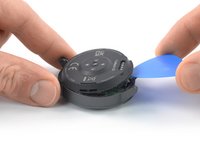
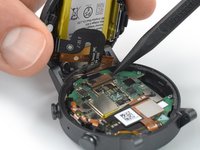
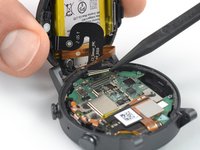
  4. Opening Procedure, Pry up the back cover assembly: adım 4, 3 resimden 1. Opening Procedure, Pry up the back cover assembly: adım 4, 3 resimden 2. Opening Procedure, Pry up the back cover assembly: adım 4, 3 resimden 3.
    • Twist the opening pick to widen the gap between the back cover assembly and the watch frame.

    • Pry upward to loosen the back cover assembly.

    • Don't try to remove the back cover assembly all the way yet. It's still connected to the motherboard.

    FixBot'a Sor

    Yorum Ekle

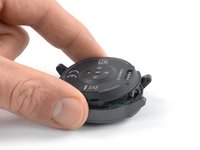
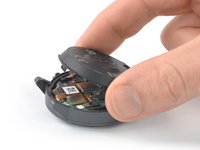
  5. Opening Procedure, Free the back cover assembly: adım 5, 2 resimden 1. Opening Procedure, Free the back cover assembly: adım 5, 2 resimden 2.
    • Carefully lift up the bottom edge of the back cover assembly to make sure it isn't adhered to the watch frame anymore.

    • Avoid straining or tearing the sensor or battery cables.

    FixBot'a Sor

    Yorum Ekle

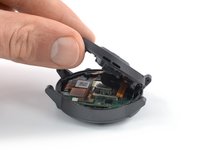
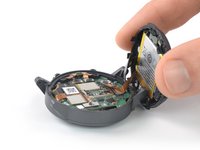
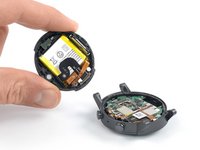
  6. Opening Procedure, Open the watch: adım 6, 2 resimden 1. Opening Procedure, Open the watch: adım 6, 2 resimden 2.
    • Grab the back cover assembly and carefully bring it into an upright position next to the watch housing.

    FixBot'a Sor

    Yorum Ekle

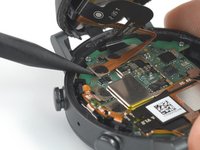
  7. Opening Procedure, Disconnect the battery cable: adım 7, 2 resimden 1. Opening Procedure, Disconnect the battery cable: adım 7, 2 resimden 2.
    • Use a spudger to disconnect the battery cable by prying the connector straight up from its socket.

    • To re-attach press connectors like this one, carefully align and press down on one side until it clicks into place, then repeat on the other side. Do not press down on the middle. If the connector is misaligned, the pins can bend, causing permanent damage.

    FixBot'a Sor

    Yorum Ekle

  8. Opening Procedure, Disconnect the sensor cable: adım 8, 2 resimden 1. Opening Procedure, Disconnect the sensor cable: adım 8, 2 resimden 2.
    • Use a spudger to disconnect the sensor cable by prying the connector straight up from its socket.

    FixBot'a Sor

    Yorum Ekle

  9. Opening Procedure, Remove the back cover assembly: adım 9, 2 resimden 1. Opening Procedure, Remove the back cover assembly: adım 9, 2 resimden 2.
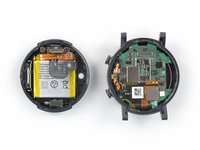
    • Remove the back cover assembly.

    FixBot'a Sor

    Yorum Ekle

Sonuç

To reassemble your device, follow these instructions in reverse order.

During reassembly, apply new adhesive where it's necessary after cleaning the relevant areas with isopropyl alcohol (>90%).

Take your e-waste to an R2 or e-Stewards certified recycler.

Repair didn’t go as planned? Try some basic troubleshooting, or ask our TicWatch E3 answers community for help.

İptal et: Bu kılavuzu tamamlamadım.

Bir başkası bu kılavuzu tamamladı.

Dominik Schnabelrauch

Üyelik tarihi: 11/23/16

261.411 İtibar

682 adet Kılavuz yazıldı

Ekip

iFixit iFixit üyesi

Staff

123 Üyeler

31.437 adet Kılavuz yazıldı

1Rehber Yorum

I appreciate the details and sequence of photos. I hope I won't need this guide, but it's comforting to know you put this together!

BruceG - Yanıt Paylaş

Yorum Ekle

İstatistikleri Görüntüle:

Son 24 Saat: 1

Son 7 gün: 10

Son 30 gün: 37

Her zaman: 746