Ana içeriğe geç
Onarım Topluluğuna Katılın - Hesap Oluşturun

Samsung Stratosphere Flex Cable Replacement

Neye ihtiyacın var

    1. Samsung Stratosphere Flex Cable Replacement, Battery: adım 1, 1 resimden 1.
      • Using your fingers, pry along the groove at the top of the phone.

      • Pull back on the rear casing until it comes free from the device.

      • The casing will make a cracking sound as it is removed.

      FixBot'a Sor

      Yorum Ekle

    2. Samsung Stratosphere Flex Cable Replacement: adım 2, 1 resimden 1.
      • With your fingers, pry from the bottom of the battery to loosen it.

      • Lift away to remove the battery from the phone.

      FixBot'a Sor

      Yorum Ekle

    1. Samsung Stratosphere Flex Cable Replacement, Motherboard: adım 3, 1 resimden 1.
      • Locate the red and white sim card located above the battery housing.

      • Remove the sim card by sliding it downwards from its slot with your fingers.

      FixBot'a Sor

      Yorum Ekle

    2. Samsung Stratosphere Flex Cable Replacement: adım 4, 1 resimden 1.
      Bu adımda kullanılan alet:
      Tweezers
      $4.99
      • Remove the seven silver 3mm screws securing the rear panel using the Phillips #000 screwdriver.

      • Once loosened, some screws may get stuck in the casing. Use tweezers to remove them.

      FixBot'a Sor

      Yorum Ekle

    3. Samsung Stratosphere Flex Cable Replacement: adım 5, 1 resimden 1.
      • Pry around the rear panel with a plastic opening tool to loosen it.

      • Prying too deeply may damage delicate components inside the phone.

      • Remove the rear panel from the phone with your fingers.

      FixBot'a Sor

      Yorum Ekle

    4. Samsung Stratosphere Flex Cable Replacement: adım 6, 1 resimden 1.
      • Remove the four black 3mm screws securing the motherboard with the Phillips #000 screwdriver.

      FixBot'a Sor

      Yorum Ekle

    5. Samsung Stratosphere Flex Cable Replacement: adım 7, 2 resimden 1. Samsung Stratosphere Flex Cable Replacement: adım 7, 2 resimden 2.
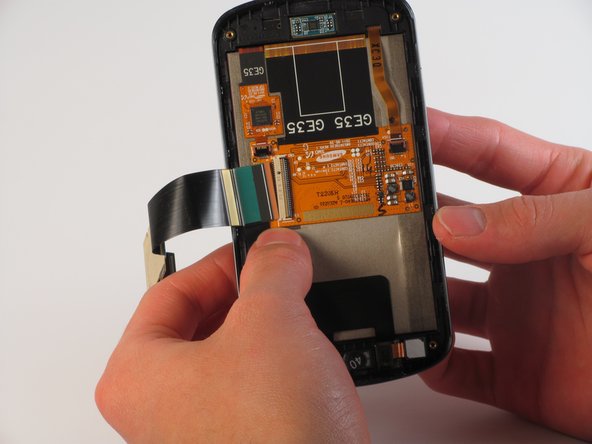
      • Locate the flex cable attachment at the tab with a green arrow printed on top.

      • Pry from the side the arrow is pointing with your fingers.

      • The cable will audibly snap as it is removed from its attachment.

      • Let the cable hang loosely to the side of the phone.

      FixBot'a Sor

      Yorum Ekle

    6. Samsung Stratosphere Flex Cable Replacement: adım 8, 1 resimden 1.
      • Pull the motherboard up from the side opposite the loose flex cable.

      • If necessary, use a plastic opening tool to separate the motherboard from the key pad underneath.

      • Lift to remove the motherboard from the device.

      FixBot'a Sor

      Yorum Ekle

    1. Samsung Stratosphere Flex Cable Replacement, Front Camera: adım 9, 1 resimden 1.
      • Insert a plastic opening tool into any side of the phone case to separate the keyboard from the rear panel.

      • Pry the keyboard away from the casing with the plastic opening tool.

      • The keyboard should come off with almost no force at all.

      FixBot'a Sor

      Yorum Ekle

    2. Samsung Stratosphere Flex Cable Replacement: adım 10, 1 resimden 1.
      • Remove the 7 silver 2mm screws attaching the silver metal plate to the rear panel with the Phillips #000 Screwdriver.

      FixBot'a Sor

      Yorum Ekle

    3. Samsung Stratosphere Flex Cable Replacement: adım 11, 1 resimden 1.
      • Use the plastic opening tool to carefully loosen the golden metal plate.

      • The golden metal plate is stuck to the rear panel with a strong adhesive, so a moderate amount of force may be needed.

      FixBot'a Sor

      Yorum Ekle

    4. Samsung Stratosphere Flex Cable Replacement: adım 12, 1 resimden 1.
      • Lift the gold plate with your fingers, repositioning it to slide through the keyboard casing underneath.

      • Carefully take off the keyboard casing with your fingers.

      • The golden metal plate should fit through the wide slot of the casing.

      FixBot'a Sor

      Yorum Ekle

    5. Samsung Stratosphere Flex Cable Replacement: adım 13, 1 resimden 1.
      • Slide the silver metal plate down and away from the to the flex cable and gold metal plate.

      • The metal plate is attached to springs that offer a small amount of resistance, so it will snap into place.

      FixBot'a Sor

      Yorum Ekle

    6. Samsung Stratosphere Flex Cable Replacement: adım 14, 1 resimden 1.
      • Unscrew the 4 black 3mm screws from the rear panel with the Phillips #000 Screwdriver.

      FixBot'a Sor

      Yorum Ekle

    7. Samsung Stratosphere Flex Cable Replacement: adım 15, 2 resimden 1. Samsung Stratosphere Flex Cable Replacement: adım 15, 2 resimden 2.
      • Insert the plastic opening tool into the groove at the top of the rear panel.

      • Firmly slide the plastic opening tool all around the rear panel. The panel will audibly snap as it comes apart.

      • These 2 pieces are attached well, so a significant amount of force is needed to separate them.

      FixBot'a Sor

      Yorum Ekle

    8. Samsung Stratosphere Flex Cable Replacement: adım 16, 1 resimden 1.
      • Lift the flex cable and position it so the part containing the metal plate can come free.

      • Pull the part containing the metal plate away from the rest of the rear panel.

      FixBot'a Sor

      Yorum Ekle

    9. Samsung Stratosphere Flex Cable Replacement: adım 17, 2 resimden 1. Samsung Stratosphere Flex Cable Replacement: adım 17, 2 resimden 2.
      Bu adımda kullanılan alet:
      Tweezers
      $4.99
      • Use tweezers to loosen the front-facing camera from the plastic casing.

      • Pull the black rectangular piece, attached to the front facing camera, away from the rear panel.

      FixBot'a Sor

      Yorum Ekle

    1. Samsung Stratosphere Flex Cable Replacement, Flex Cable: adım 18, 1 resimden 1.
      • Carefully peel the blue tape from the bottom of the flex cable and set it aside.

      FixBot'a Sor

      Yorum Ekle

    2. Samsung Stratosphere Flex Cable Replacement: adım 19, 2 resimden 1. Samsung Stratosphere Flex Cable Replacement: adım 19, 2 resimden 2.
      • Use one of the plastic opening tools to loosen the flex cable from its central housing.

      • Pull lightly on the flex cable to free it from the housing.

      • The cable may audibly snap as it is freed from its attachment.

      FixBot'a Sor

      Yorum Ekle

    3. Samsung Stratosphere Flex Cable Replacement: adım 20, 1 resimden 1.
      Bu adımda kullanılan alet:
      Tweezers
      $4.99
      • Use tweezers to loosen the flex cable and speaker from the bottom of the phone.

      • Pull upward with the tweezers and the flex cable will come loose.

      • The flex cable will come free with the front-facing camera attached. In order to remove the front-facing camera, see our guide here.

      FixBot'a Sor

      Yorum Ekle

Sonuç

To reassemble your device, follow these instructions in reverse order.

İptal et: Bu kılavuzu tamamlamadım.

2 farklı kişi bu kılavuzu tamamladı.

Jonathan Oyan

Üyelik tarihi: 10/18/13

624 İtibar

1 Kılavuz yazıldı

Ekip

Cal Poly, Team 11-32, Amido Fall 2013 Cal Poly, Team 11-32, Amido Fall 2013 üyesi

CPSU-AMIDO-F13S11G32

4 Üyeler

24 adet Kılavuz yazıldı

0Kılavuz Yorumları

Yorum Ekle

İstatistikleri Görüntüle:

Son 24 Saat: 0

Son 7 gün: 12

Son 30 gün: 34

Her zaman: 1,703