Ana içeriğe geç
Onarım Topluluğuna Katılın - Hesap Oluşturun
Sony Handycam FDR-AX33 Microphone Replacement

Neye ihtiyacın var

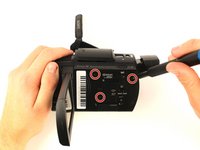
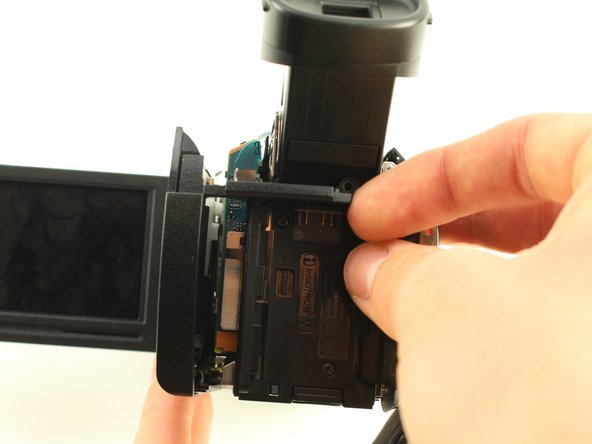
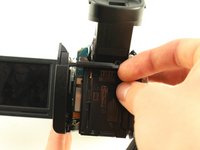
  1. Sony Handycam FDR-AX33 Microphone Replacement, Panel: adım 1, 2 resimden 1. Sony Handycam FDR-AX33 Microphone Replacement, Panel: adım 1, 2 resimden 2.
    • Remove the battery by pushing the latch towards the body of the camera. Push the battery down and pull it out.

    • Remove the six black 4 mm Phillips #00 screws from the bottom panel of the camera.

    • Pull off the bottom panel. It may be difficult, but tugging on it shouldn't cause harm to yourself or the device.

    • Be sure to un-velcro the handle strap.

    FixBot'a Sor

    Yorum Ekle

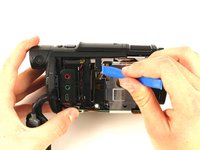
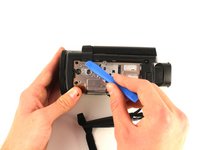
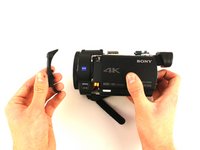
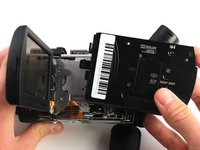
  2. Sony Handycam FDR-AX33 Microphone Replacement: adım 2, 3 resimden 1. Sony Handycam FDR-AX33 Microphone Replacement: adım 2, 3 resimden 2. Sony Handycam FDR-AX33 Microphone Replacement: adım 2, 3 resimden 3.
    • Remove the 3 mm Phillips #00 screw from the bottom of the camera.

    • Remove the 4 mm Phillips #00 screw from the right panel.

    • Pull the right panel off. Again, it might be difficult, but pulling hard shouldn't harm you or the camera.

    • You may have to use the opening tool to remove this panel.

    FixBot'a Sor

    Yorum Ekle

  3. Sony Handycam FDR-AX33 Microphone Replacement: adım 3, 2 resimden 1. Sony Handycam FDR-AX33 Microphone Replacement: adım 3, 2 resimden 2.
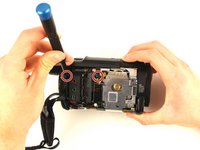
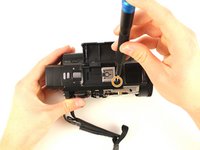
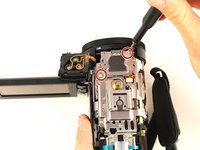
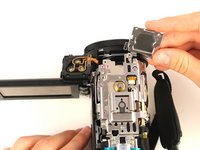
    • Remove the two 4 mm Phillips #00 screws from the top right corner of the camera.

    • Remove the 4 mm Phillips #00 screw from in front of the flash mount.

    FixBot'a Sor

    Yorum Ekle

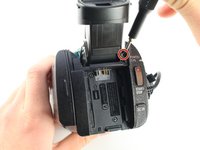
  4. Sony Handycam FDR-AX33 Microphone Replacement: adım 4, 2 resimden 1. Sony Handycam FDR-AX33 Microphone Replacement: adım 4, 2 resimden 2.
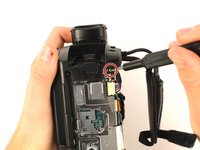
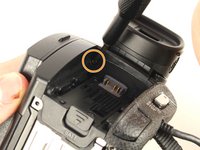
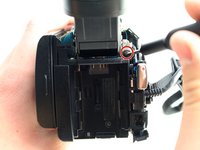
    • Remove the 3 mm Phillips #00 screw from below the right side of the battery slot.

    • Remove the black 5 mm Phillips #00 screw from the top of the battery slot.

    FixBot'a Sor

    Yorum Ekle

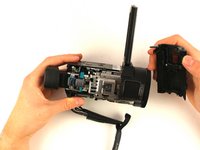
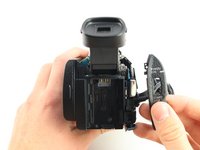
  5. Sony Handycam FDR-AX33 Microphone Replacement: adım 5, 3 resimden 1. Sony Handycam FDR-AX33 Microphone Replacement: adım 5, 3 resimden 2. Sony Handycam FDR-AX33 Microphone Replacement: adım 5, 3 resimden 3.
    • Remove the three 4 mm Phillips #00 screws from the left panel underneath the display screen.

    • You’ll need to extend the eyepiece by pulling it out from the body of the camera.

    • Pull the top panel off of the device with the iFixit opening tool.

    FixBot'a Sor

    Yorum Ekle

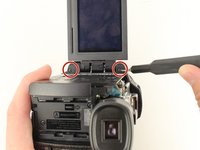
  6. Sony Handycam FDR-AX33 Microphone Replacement: adım 6, 3 resimden 1. Sony Handycam FDR-AX33 Microphone Replacement: adım 6, 3 resimden 2. Sony Handycam FDR-AX33 Microphone Replacement: adım 6, 3 resimden 3.
    • Remove the top and bottom 4 mm Phillips #00 screws from the display screen hinge.

    • Use the iFixit opening tool to remove the screen hinge.

    FixBot'a Sor

    Yorum Ekle

  7. Sony Handycam FDR-AX33 Microphone Replacement: adım 7, 2 resimden 1. Sony Handycam FDR-AX33 Microphone Replacement: adım 7, 2 resimden 2.
    • Remove the 3 mm Phillips #00 screw from between the eyepiece and the panel directly to the right of the battery slot.

    • Angle the eyepiece up to reach the screw with the screwdriver.

    • Take the panel directly to the right of the battery slot off of the camera.

    FixBot'a Sor

    Yorum Ekle

  8. Sony Handycam FDR-AX33 Microphone Replacement: adım 8, 3 resimden 1. Sony Handycam FDR-AX33 Microphone Replacement: adım 8, 3 resimden 2. Sony Handycam FDR-AX33 Microphone Replacement: adım 8, 3 resimden 3.
    • Remove the 4 mm Phillips #00 screw above and to the right of the battery slot.

    • Pry the left panel out at an angle by pushing the plastic slat between the battery slot and the eyepiece.

    • Wiggle the left panel and pull it out gently.

    • The left panel can be hard to remove so make sure to apply a good amount of force, but be cautious to not harm yourself or the device.

    FixBot'a Sor

    Yorum Ekle

  9. Sony Handycam FDR-AX33 Microphone Replacement, Microphone: adım 9, 1 resimden 1.
    • Pry up the plastic frame around the camera’s microphone.

    • Be careful with the thin plastic frame as it might break. If it does break, it shouldn't affect the camera's performance.

    FixBot'a Sor

    Yorum Ekle

  10. Sony Handycam FDR-AX33 Microphone Replacement: adım 10, 1 resimden 1.
    • Pull back clips to release microphone.

    FixBot'a Sor

    Yorum Ekle

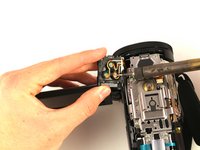
  11. Sony Handycam FDR-AX33 Microphone Replacement: adım 11, 3 resimden 1. Sony Handycam FDR-AX33 Microphone Replacement: adım 11, 3 resimden 2. Sony Handycam FDR-AX33 Microphone Replacement: adım 11, 3 resimden 3.
    • Desolder the three connections on the bottom of the microphone. Refer to the soldering guide linked here.

    • Remove the two 3 mm Phillips #00 screws to release the microphone mount.

    • Removing the microphone mount is not required to replace the microphone.

    FixBot'a Sor

    Yorum Ekle

Sonuç

To reassemble your device, follow these instructions in reverse order.

İptal et: Bu kılavuzu tamamlamadım.

Bir başkası bu kılavuzu tamamladı.

Cameron Casey

Üyelik tarihi: 01/24/19

187 İtibar

1 Kılavuz yazıldı

Ekip

Cal Poly, Team S18-G2, White Winter 2019 Cal Poly, Team S18-G2, White Winter 2019 üyesi

CPSU-WHITE-W19S18G2

4 Üyeler

12 adet Kılavuz yazıldı

0Kılavuz Yorumları

Yorum Ekle

İstatistikleri Görüntüle:

Son 24 Saat: 2

Son 7 gün: 5

Son 30 gün: 26

Her zaman: 1,032