Bu çeviri bir makine tarafından oluşturulmuştur ve henüz bir kişi tarafından incelenmemiştir. Bu dili konuşuyor musunuz? İnceleme için.
Giriş
Sony Walkman D-E356CK cihazınızda sorunlar yaşıyorsanız, arka paneli çıkardıktan sonra disk okuyucuyu sökmeniz gerekecektir. Sony Walkman D-E356CK'nin disk okuyucusunu çıkarmak için bu kılavuzu kullanın. Bu kılavuz için ihtiyacınız olan tek araç bir ayırma aparatı ve bir yıldız tornavidadır.
Neye ihtiyacın var
-
-
-
Cihazın sol alt köşesinde bulunan ve üzerinde "open" yazan düğmeye basın.
-
11 mm uzunluğundaki üç adet yıldız vidayı çıkarın.
-
-
-
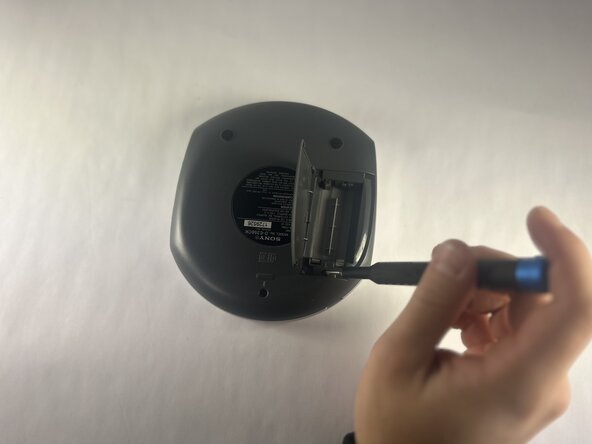
Batarya bölmesini açın.
-
Walkman'in arka tarafındaki iki adet 11 mm uzunluğundaki yıldız vidayı çıkarın.
-
-
-
-
Arka panel ve kasa arasındaki boşluğa bir açma aleti yerleştirin.
-
Arka panel çıkana kadar çevresi boyunca dikkatlice ayırın.
-
Arka paneli çıkarın.
-
-
-
-
Anakartın arka kısmını ortaya çıkarmak için anakartı nazikçe kaldırın.
-
İki adet JST konnektörünü ayırın.
-
-
-
-
-
Disk motoru muhafazasını ön panelden çıkarın ve ters çevirin.
-
5 mm'lik vidaları disk motorundan sökün.
-
-
-
-
-
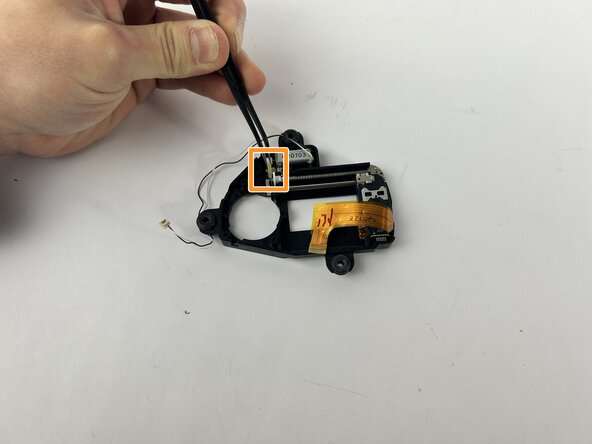
Görselde bulunan şeffaf plastik parçayı dikkatlice çıkarın.
-
Şeffaf sarı dişliyi dikkatlice çıkarmak için cımbız kullanın.
-
-

 FixBot'a Sor






Cihazınızı yeniden toplamak için yukarıdaki adımları ters sırayla uygulayın.
Elektronik atıklarınızı R2 veya e-Stewards sertifikalı bir geri dönüşüm tesisine götürün.
Onarım planlandığı gibi gitmedi mi? Bazı temel sorun giderme adımlarını deneyin veya yardım için Answers topluluğumuza danışın.

Ekip

UMass Dartmouth, Team 1-1, Botvin Fall 2025 UMass Dartmouth, Team 1-1, Botvin Fall 2025 üyesi
UMASSD-BOTVIN-F25S1G1
4 Üyeler
36 adet Kılavuz yazıldı
