Ana içeriğe geç
Onarım Topluluğuna Katılın - Hesap Oluşturun

Tagital T7X Screen/ Digitizer Replacement

Neye ihtiyacın var

  1. Tagital T7X Screen/ Digitizer Replacement, Case: adım 1, 3 resimden 1. Tagital T7X Screen/ Digitizer Replacement, Case: adım 1, 3 resimden 2. Tagital T7X Screen/ Digitizer Replacement, Case: adım 1, 3 resimden 3.
    • Place the Tagital T7X on a sturdy surface.

    • Insert the plastic opening tool into the crack and pry open the tablet. Move the tool along the edge, while continuing to pry up the casing.

    FixBot'a Sor
  2. Tagital T7X Screen/ Digitizer Replacement, Battery: adım 2, 2 resimden 1. Tagital T7X Screen/ Digitizer Replacement, Battery: adım 2, 2 resimden 2.
    • Follow the attached wires to the positive and negative connections.

    FixBot'a Sor
  3. Tagital T7X Screen/ Digitizer Replacement: adım 3, 3 resimden 1. Tagital T7X Screen/ Digitizer Replacement: adım 3, 3 resimden 2. Tagital T7X Screen/ Digitizer Replacement: adım 3, 3 resimden 3.
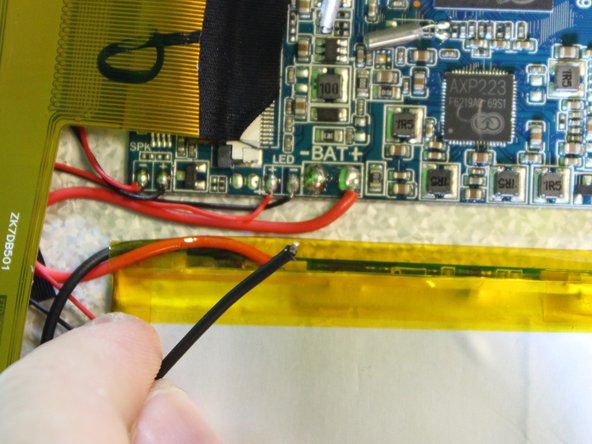
    • The soldering iron can destroy components on the motherboard. Only touch the soldering iron to the solder already on the board.

    • Touch the tip of the soldering iron to the solder connecting the negative wire.

    • Pull back on the wire with the iron in place, removing it from the hot solder.

    • The solder will be melted almost instantly. There is no need to hold the iron on the solder for more than a second or two. Visit iFixit's soldering guide for more info.

    • Repeat this step for the positive wire.

    FixBot'a Sor
  4. Tagital T7X Screen/ Digitizer Replacement: adım 4, 3 resimden 1. Tagital T7X Screen/ Digitizer Replacement: adım 4, 3 resimden 2. Tagital T7X Screen/ Digitizer Replacement: adım 4, 3 resimden 3.
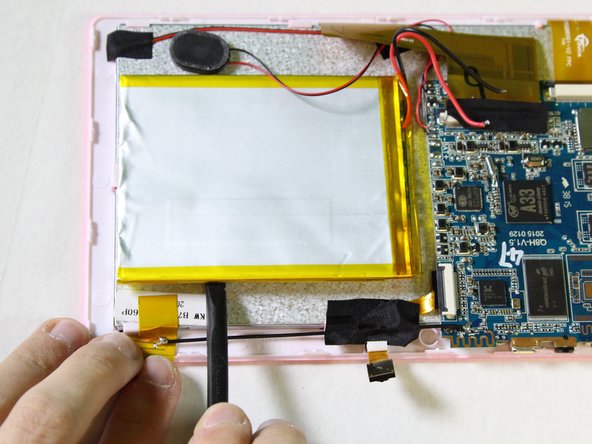
    • Use the nylon spudger to pry the battery from the back of the screen. Work your way around the edges, similar to opening the casing.

    • The adhesive used to hold the battery down is very strong. Don't be afraid to use some force.

    FixBot'a Sor
  5. Tagital T7X Screen/ Digitizer Replacement, Speaker: adım 5, 3 resimden 1. Tagital T7X Screen/ Digitizer Replacement, Speaker: adım 5, 3 resimden 2. Tagital T7X Screen/ Digitizer Replacement, Speaker: adım 5, 3 resimden 3.
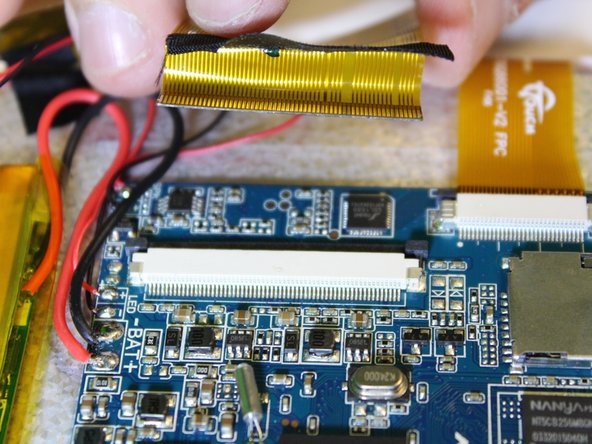
    • Remove the ribbon cable on the top left corner of the mother board.

    • Gently lift the black tape up to see the ribbon cable socket.

    FixBot'a Sor
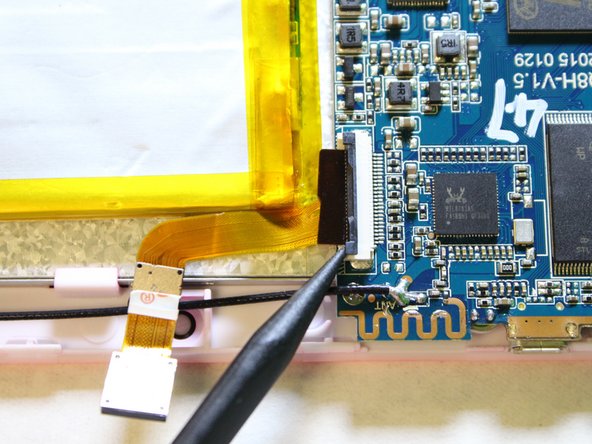
  6. Tagital T7X Screen/ Digitizer Replacement: adım 6, 3 resimden 1. Tagital T7X Screen/ Digitizer Replacement: adım 6, 3 resimden 2. Tagital T7X Screen/ Digitizer Replacement: adım 6, 3 resimden 3.
    • Push both side buttons away from the socket by using a spudger.

    FixBot'a Sor
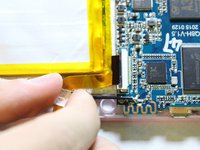
  7. Tagital T7X Screen/ Digitizer Replacement: adım 7, 2 resimden 1. Tagital T7X Screen/ Digitizer Replacement: adım 7, 2 resimden 2.
    • Gently pull the ribbon cable away from the socket.

    • Don't be afraid to use some force for this step.

    FixBot'a Sor
  8. Tagital T7X Screen/ Digitizer Replacement: adım 8, 2 resimden 1. Tagital T7X Screen/ Digitizer Replacement: adım 8, 2 resimden 2.
    • The soldering iron can destroy components on the motherboard. Only touch the soldering iron to the solder already on the board.

    • Touch the tip of the soldering iron to the solder connecting the positive (red) wire.

    • Pull back on the wire with the iron in place, removing it from the hot solder.

    • Repeat this step for the negative wire.

    • The solder will be melted almost instantly. There is no need to hold the iron on the solder for than a second or two. Visit IFixit's soldering guide for more info.

    FixBot'a Sor
  9. Tagital T7X Screen/ Digitizer Replacement: adım 9, 2 resimden 1. Tagital T7X Screen/ Digitizer Replacement: adım 9, 2 resimden 2.
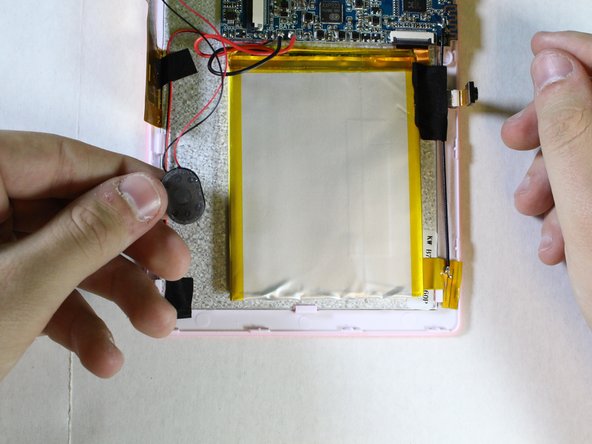
    • Remove the speaker from the motherboard.

    FixBot'a Sor
  10. Tagital T7X Screen/ Digitizer Replacement, Camera: adım 10, 3 resimden 1. Tagital T7X Screen/ Digitizer Replacement, Camera: adım 10, 3 resimden 2. Tagital T7X Screen/ Digitizer Replacement, Camera: adım 10, 3 resimden 3.
    • Use a spudger to hold the cameras in place.

    • Gently pull the black tape away using your finger.

    FixBot'a Sor
  11. Tagital T7X Screen/ Digitizer Replacement: adım 11, 3 resimden 1. Tagital T7X Screen/ Digitizer Replacement: adım 11, 3 resimden 2. Tagital T7X Screen/ Digitizer Replacement: adım 11, 3 resimden 3.
    • Remove the ribbon cable from the motherboard.

    • Use a spudger to lift the two tabs, freeing the ribbon cable from the socket.

    FixBot'a Sor
  12. Tagital T7X Screen/ Digitizer Replacement: adım 12, 3 resimden 1. Tagital T7X Screen/ Digitizer Replacement: adım 12, 3 resimden 2. Tagital T7X Screen/ Digitizer Replacement: adım 12, 3 resimden 3.
    • Gently pull the ribbon cable away from the motherboard.

    • Don't be afraid to use some force to pull the ribbon cable.

    FixBot'a Sor
  13. Tagital T7X Screen/ Digitizer Replacement, Motherboard: adım 13, 2 resimden 1. Tagital T7X Screen/ Digitizer Replacement, Motherboard: adım 13, 2 resimden 2.
    • Next we will disconnect the digitizer ribbon cable from the motherboard.

    • Using the black spudger, gently push the tabs on each side of the socket to free the ribbon cable.

    FixBot'a Sor
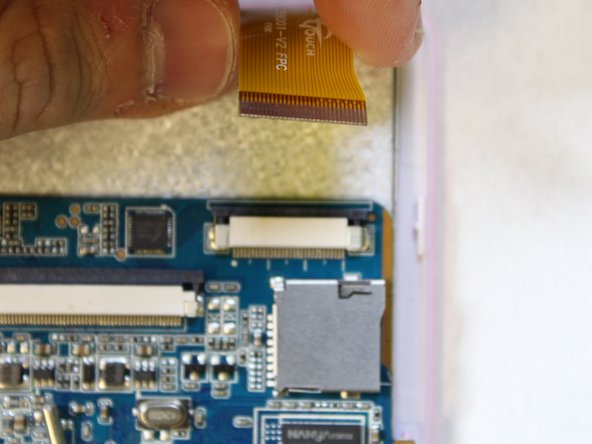
  14. Tagital T7X Screen/ Digitizer Replacement: adım 14, 2 resimden 1. Tagital T7X Screen/ Digitizer Replacement: adım 14, 2 resimden 2.
    • Gently pull on the ribbon cable, separating it from the socket.

    FixBot'a Sor
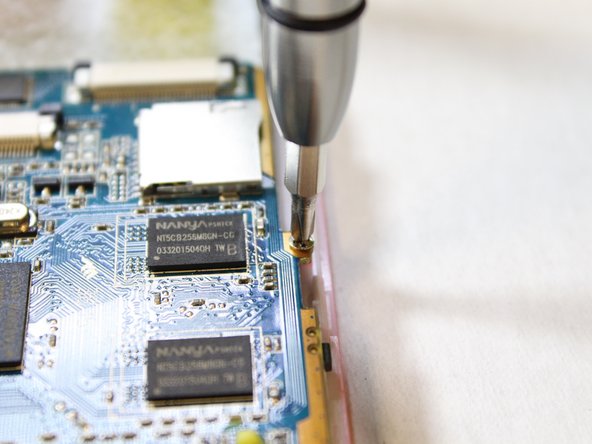
  15. Tagital T7X Screen/ Digitizer Replacement: adım 15, 3 resimden 1. Tagital T7X Screen/ Digitizer Replacement: adım 15, 3 resimden 2. Tagital T7X Screen/ Digitizer Replacement: adım 15, 3 resimden 3.
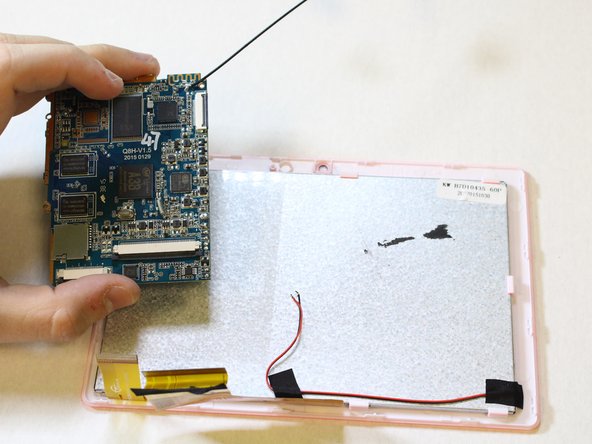
    • Next, we will unscrew the three PH#0 screws anchoring the motherboard into the case.

    • You will need the Phillips Screw #0 to remove the screws of the motherboard.

    • Using the screwdriver, with the PH#0 attachment, carefully unscrew the screws of the motherboard in order to remove it from the device.

    FixBot'a Sor
  16. Tagital T7X Screen/ Digitizer Replacement, Screen/ Digitizer: adım 16, 3 resimden 1. Tagital T7X Screen/ Digitizer Replacement, Screen/ Digitizer: adım 16, 3 resimden 2. Tagital T7X Screen/ Digitizer Replacement, Screen/ Digitizer: adım 16, 3 resimden 3.
    • Insert a plastic opening tool where the screen connects with the front face of the case.

    • Use a spudger to keep the screen from falling back into the casing.

    • The screen will slide out once the connection has been nudged on three sides.

    FixBot'a Sor
Sonuç

To reassemble your device, follow these instructions in reverse order.

2 farklı kişi bu kılavuzu tamamladı.

Garven Dabady

Üyelik tarihi: 02/10/16

370 İtibar

2 adet Kılavuz yazıldı

Ekip

USF Tampa, Team 2-1, Sullivan Spring 2016 USF Tampa, Team 2-1, Sullivan Spring 2016 üyesi

USFT-SULLIVAN-S16S2G1

4 Üyeler

12 adet Kılavuz yazıldı

0Kılavuz Yorumları

Yorum Ekle

İstatistikleri Görüntüle:

Son 24 Saat: 1

Son 7 gün: 7

Son 30 gün: 54

Her zaman: 940