Ana içeriğe geç
Onarım Topluluğuna Katılın - Hesap Oluşturun

Xbox One Wireless Controller Bottom Motherboard Replacement

Neye ihtiyacın var

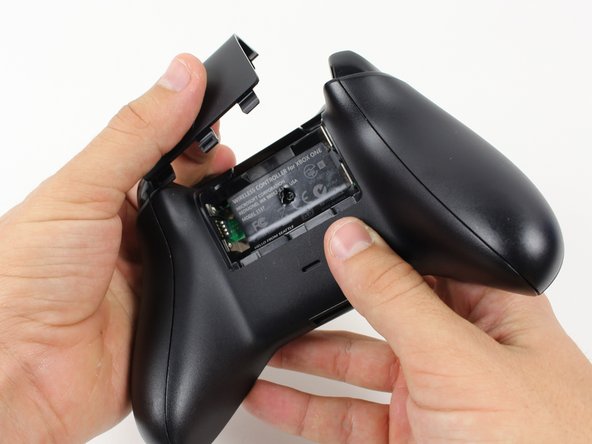
  1. Xbox One Wireless Controller Bottom Motherboard Replacement, Battery Pack: adım 1, 1 resimden 1.
    • Remove the battery pack cover.

    • Remove batteries.

    FixBot'a Sor

    Yorum Ekle

  2. Xbox One Wireless Controller Bottom Motherboard Replacement, Side Handles: adım 2, 2 resimden 1. Xbox One Wireless Controller Bottom Motherboard Replacement, Side Handles: adım 2, 2 resimden 2.
    • We recommend using a nylon spudger for this step. A metal spudger is shown.

    • Grip the controller firmly to remove the side handles, wedging a spudger into the seam between the front and handle plates.

    • Pry the side plate away from the front plate by moving the spudger back and forth. You will need to do this all the way around the side plate's seam.

    FixBot'a Sor
    Yorum Ekle

  3. Xbox One Wireless Controller Bottom Motherboard Replacement, Screws: adım 3, 2 resimden 1. Xbox One Wireless Controller Bottom Motherboard Replacement, Screws: adım 3, 2 resimden 2.
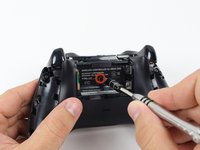
    • There is a hidden screw located in the middle of the controller behind the label.

    • Use a screwdriver and punch a hole directly in the center of the label.

    • You may also lift the label if you do not want to puncture it.

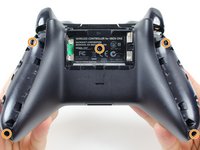
    • Remove the five 10mm screws located on the back of the controller using the TR8 Security Torx Screwdriver.

    FixBot'a Sor
    Yorum Ekle

  4. Xbox One Wireless Controller Bottom Motherboard Replacement, Backplate: adım 4, 1 resimden 1.
    • Remove the backplate.

    FixBot'a Sor

    Yorum Ekle

  5. Xbox One Wireless Controller Bottom Motherboard Replacement, Faceplate: adım 5, 1 resimden 1.
    • Remove the faceplate.

    FixBot'a Sor

    Yorum Ekle

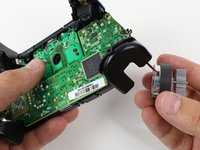
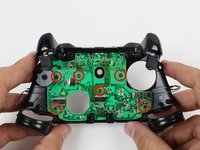
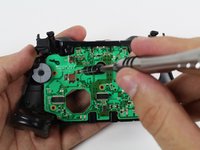
  6. Xbox One Wireless Controller Bottom Motherboard Replacement, Top Motherboard: adım 6, 2 resimden 1. Xbox One Wireless Controller Bottom Motherboard Replacement, Top Motherboard: adım 6, 2 resimden 2.
    • You may let the rumble motors hang freely out of their sockets.

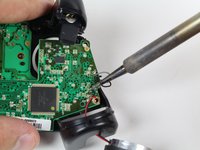
    • De-solder the soldered joints while holding the red and black wires down on the top motherboard.

    • De-solder the black and gray wires that are attached to the top motherboard.

    • Remove the rumble motors and set them aside.

    • Be careful while using the soldering iron not to damage other components or hurt yourself.

    • For information on how to solder, click here.

    FixBot'a Sor
    Yorum Ekle

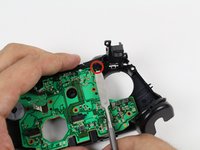
  7. Xbox One Wireless Controller Bottom Motherboard Replacement: adım 7, 1 resimden 1.
    • Unscrew the two 7mm T6 screws located near the rumble motor sockets.

    FixBot'a Sor
    Yorum Ekle

  8. Xbox One Wireless Controller Bottom Motherboard Replacement: adım 8, 1 resimden 1.
    • Firmly grip sides of motherboard near the middle.

    • Lift upwards while slightly wiggling the motherboard forward and backward.

    • Lifting the motherboard will require some force.

    FixBot'a Sor

    Yorum Ekle

  9. Xbox One Wireless Controller Bottom Motherboard Replacement, Trigger Rumble Motors: adım 9, 1 resimden 1.
    • Remove the yellow tape holding the wires in place on the front of the controller.

    FixBot'a Sor

    Yorum Ekle

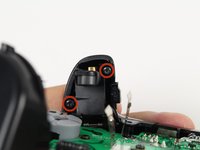
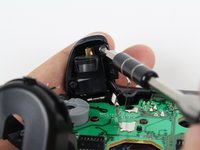
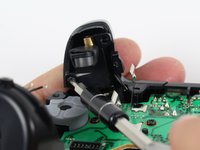
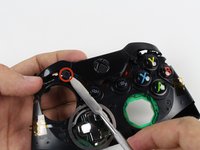
  10. Xbox One Wireless Controller Bottom Motherboard Replacement: adım 10, 3 resimden 1. Xbox One Wireless Controller Bottom Motherboard Replacement: adım 10, 3 resimden 2. Xbox One Wireless Controller Bottom Motherboard Replacement: adım 10, 3 resimden 3.
    • Unscrew the two 7mm T6 Hex screws located on underside the triggers.

    FixBot'a Sor
    Yorum Ekle

  11. Xbox One Wireless Controller Bottom Motherboard Replacement: adım 11, 1 resimden 1.
    • Remove the trigger covers.

    FixBot'a Sor
    Yorum Ekle

  12. Xbox One Wireless Controller Bottom Motherboard Replacement: adım 12, 1 resimden 1.
    • Desolder the wires from the motherboard.

    • Remove the rumble motors from its socket and pull the wire with it.

    FixBot'a Sor

    Yorum Ekle

  13. Xbox One Wireless Controller Bottom Motherboard Replacement, Bottom Motherboard: adım 13, 2 resimden 1. Xbox One Wireless Controller Bottom Motherboard Replacement, Bottom Motherboard: adım 13, 2 resimden 2.
    • Remove the six T6 Torx screws located on the bottom motherboard.

    FixBot'a Sor

    Yorum Ekle

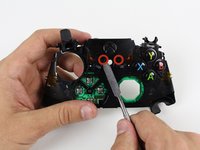
  14. Xbox One Wireless Controller Bottom Motherboard Replacement: adım 14, 2 resimden 1. Xbox One Wireless Controller Bottom Motherboard Replacement: adım 14, 2 resimden 2.
    • Remove the bumpers by prying them off of the pegs that secure them, using a spudger. They are located on the front and back of the controller.

    • A standard nylon spudger is recommended for this step. Using a metal spudger near the motherboard as shown risks damaging your device.

    FixBot'a Sor

    Yorum Ekle

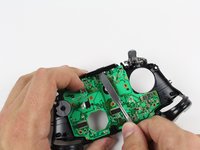
  15. Xbox One Wireless Controller Bottom Motherboard Replacement: adım 15, 2 resimden 1. Xbox One Wireless Controller Bottom Motherboard Replacement: adım 15, 2 resimden 2.
    • Lift the piece surrounding the Home button off of its pegs.

    • Pry it off of the other side, using a spudger on the pins.

    • A standard nylon spudger is recommended for this step. Using a metal spudger near the motherboard as shown risks damaging your device.

    • Removing this piece may require a lot of force.

    FixBot'a Sor

    Yorum Ekle

  16. Xbox One Wireless Controller Bottom Motherboard Replacement: adım 16, 1 resimden 1.
    • Remove the bottom motherboard.

    FixBot'a Sor

    Yorum Ekle

Sonuç

To reassemble your device, follow these instructions in reverse order.

İptal et: Bu kılavuzu tamamlamadım.

31 farklı kişi bu kılavuzu tamamladı.

Liam Gow

Üyelik tarihi: 01/22/15

5.594 İtibar

3 adet Kılavuz yazıldı

Ekip

Cal Poly, Team 20-15, Maness Winter 2015 Cal Poly, Team 20-15, Maness Winter 2015 üyesi

CPSU-MANESS-W15S20G15

5 Üyeler

54 adet Kılavuz yazıldı

11Kılavuz Yorumları

Is de-soldering optional?

John Gonzalez - Yanıt Paylaş

Considering the placement of wires attached by solder on both sides of the top board, it would be quite difficult to reach anything beneath it otherwise. I suppose it depends on what you're trying to achieve.

In any case, you might as well try to move it without desoldering if desoldering is going to be an issue. Make sure not to pull hard, though.

Liam Gow - Yanıt Paylaş

I have a question... Will the motherboard you can get at the store here work it the newer controllers with built in headphone jack?

ETHREAL1 - Yanıt Paylaş

I would expect not, I'm afraid. The motherboards will probably have different circuitry, even if the shapes are the same, which they may not be.

Liam Gow - Yanıt Paylaş

The position/mounting of the LB and RB buttons on the motherboard piece between the day-one/sans-jack and the newer 3.5mm jack (non-Slim) boards are completely different.

The older revision motherboard has the mountings inverted (pointing downwards to the south end-headset attachment port- of the controller) compared to the newer ones.

The newer ones have the circuit with the bumper buttons mounted pointing to the north end toward the bumpers on the top of the controller.

icho - Yanıt Paylaş

Yorum Ekle

İstatistikleri Görüntüle:

Son 24 Saat: 5

Son 7 gün: 48

Son 30 gün: 265

Her zaman: 67,494