
Ana içeriğe geç
Onarım Topluluğuna Katılın - Hesap Oluşturun

Samsung UN65KS8500 Backlight Issue

I'm having an odd issue with my Samsung UN65KS8500. It appears that a column of backlight has gone out just to the left of the illuminated samsung logo.
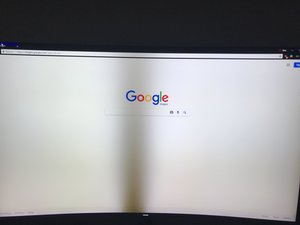
Block Image

I tried gently pressing on the bezel below the area where the backlight went out and it seems to restore the backlight.

Video clip: https://imgur.com/enuZgUu

Sometimes the "fix" lasts days, other times it only lasts minutes. Strangely sometimes it even fixes itself after some time. It is just odd. I was wondering if there is any idea on what could be causing this issue and if would be easy to fix.

Yanıtlandı! Cevabı görüntüle Ben de bu sorunu yaşıyorum

Bu iyi bir soru mu?

Puan 2
1 Yorum

Did you ever come to a resolution on this? My UN65KS8500 is doing the same thing. It’s not a constant though. Comes and goes

tarafından

Yorum Ekle

1 Cevap

Filtre ölçütü:
Seçilen Çözüm

From your description, I would suspect a bad connection either on the strip itself or perhaps the connector on the strip is not fully engaged. In any case, the unit needs to be opened up. Whether or not this can be permanently repaired can be determined once that area has been closely examined. Post a photo here of the connector and strip. Maybe you will get lucky and the connector is just loose. BTW: Has there been any pattern related to the temperature of the room or TV?

A replacement strip will run about $40 or so if the strip is damaged beyond reasonable repair.

Dan

Bu yanıt yardımcı oldu mu?

Puan 4

8 Yorum:

Thanks for the quick response! If you are referring to the LED strips, I haven’t made it far enough into the TV to locate them. I have gone as far as removing the back panel, and the speaker assembly and the boards on the back. I’m not too sure how to get to the actual LED strips. I’m aware they exist and are in there somewhere, I’m just unsure how to get to them. As far as temperature goes the room is about the same temperature most of the time, around 68-73F.

tarafından

The front bezel should come off by releasing some plastic clips on the sides that hold it to the frame. Carefully remove that plastic frame and there will be a number of "sheets" of plastic. Keep them in order and clean. Remove them and you will see the strips attached to the metal frame.

tarafından

Thanks, I will have to try that out this weekend.

tarafından

I didn't have much luck getting any further than I did the last time. I appreciate the help. I will just have to seek out other options.

tarafından

Did you get this fixed? I have the same TV doing the same thing in the exact same location and oddly enough it happened about a week before you posted. Just wondering up the problem ended up being. Thanks in advance.

tarafından

3 tane daha yorum göster

Yorum Ekle

Yanıtını ekle

mdc4115 sonsuza kadar minnettar olacak.
İstatistikleri Görüntüle:

Son 24 Saat: 0

Son 7 gün: 12

Son 30 gün: 33

Her zaman: 6,666
