Ana içeriğe geç
Onarım Topluluğuna Katılın - Hesap Oluşturun

HP Pavilion 15-au123cl CD Drive Replacement

Görüntüleme: 1,1 B

İstatistikleri görüntüle:

Son 24 Saat:
3
Son 7 Gün:
24
Son 30 Gün:
105
Her zaman:
1.079
Yorumlar: 4

4 comments on steps.

Tamamlandı: 0

Hiç kimse bu kılavuzu "tamamlandı" olarak işaretlemedi. İlk mi olacaksın?

Sık Kullanılanlar: 0

Hiç kimse bu kılavuzu favorilere eklemedi (ve abone olmadı). İlk mi olacaksın?

Gerekli Süre: 15 - 20 dakika
Zorluk: Orta
HP Pavilion 15-au123cl CD Drive Replacement

By following this guide, you will be able to replace the CD Drive. The drive is probably the easiest part to replace on the laptop.

Neye ihtiyacın var

Aletler

    1. HP Pavilion 15-au123cl CD Drive Replacement, Battery: adım 1, 1 resimden 1.
      • Make sure the laptop is off and unplugged before starting.

      • Using the plastic opening tool, remove the top rubber feet on the back panel as it hides one of the screws we will be removing.

      FixBot'a Sor

      Yorum Ekle

    2. HP Pavilion 15-au123cl CD Drive Replacement: adım 2, 2 resimden 1. HP Pavilion 15-au123cl CD Drive Replacement: adım 2, 2 resimden 2.
      • Using a PH0 screwdriver, unscrew the ten 4.4mm Phillips head screws located on the back panel.

      FixBot'a Sor

      Yorum Ekle

    3. HP Pavilion 15-au123cl CD Drive Replacement: adım 3, 2 resimden 1. HP Pavilion 15-au123cl CD Drive Replacement: adım 3, 2 resimden 2.
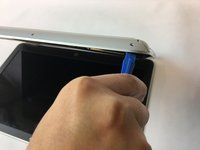
      • Using the plastic opening tool, remove the back cover of the laptop.

      • It is recommended that you start with a corner and run the tool throughout the edges of the cover.

      • Be sure not to bend the cover by applying too much force.

      FixBot'a Sor

      Yorum Ekle

    4. HP Pavilion 15-au123cl CD Drive Replacement: adım 4, 2 resimden 1. HP Pavilion 15-au123cl CD Drive Replacement: adım 4, 2 resimden 2.
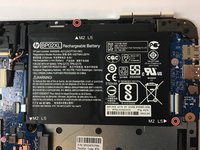
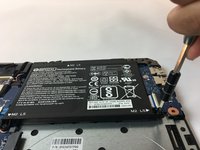
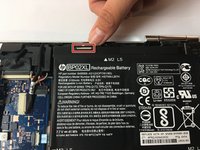
      • Using a PH0 screwdriver, unscrew the two 3.8mm PH0 Phillips head screws that hold the battery in place.

      FixBot'a Sor

      Yorum Ekle

    5. HP Pavilion 15-au123cl CD Drive Replacement: adım 5, 3 resimden 1. HP Pavilion 15-au123cl CD Drive Replacement: adım 5, 3 resimden 2. HP Pavilion 15-au123cl CD Drive Replacement: adım 5, 3 resimden 3.
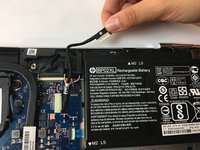
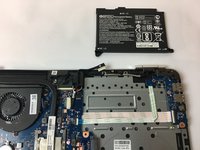
      • Carefully disconnect the cable connecting the top of the battery and remove the battery.

      FixBot'a Sor

      Yorum Ekle

    1. HP Pavilion 15-au123cl CD Drive Replacement, CD Drive: adım 6, 1 resimden 1.
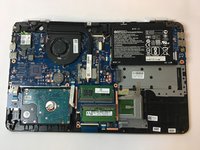
      • The CD Drive is located at the bottom right area of the motherboard.

      FixBot'a Sor

      Yorum Ekle

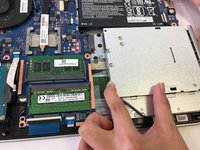
    2. HP Pavilion 15-au123cl CD Drive Replacement: adım 7, 2 resimden 1. HP Pavilion 15-au123cl CD Drive Replacement: adım 7, 2 resimden 2.
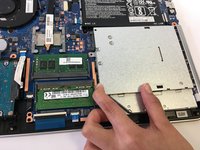
      • Disconnect the CD drive from the motherboard connector on the left.

      FixBot'a Sor

      Yorum Ekle

Sonuç

To reassemble your device, follow these instructions in reverse order.

İptal et: Bu kılavuzu tamamlamadım.

Mohammad Gardezi

Üyelik tarihi: 10/17/17

1.420 İtibar

6 adet Kılavuz yazıldı

Ekip

USF Tampa, Team S13-G3, Cagle Fall 2017 USF Tampa, Team S13-G3, Cagle Fall 2017 üyesi

USFT-CAGLE-F17S13G3

2 Üyeler

72 adet Kılavuz yazıldı

0Kılavuz Yorumları

Yorum Ekle

İstatistikleri Görüntüle:

Son 24 Saat: 3

Son 7 gün: 24

Son 30 gün: 105

Her zaman: 1,079