
Ana içeriğe geç
Onarım Topluluğuna Katılın - Hesap Oluşturun

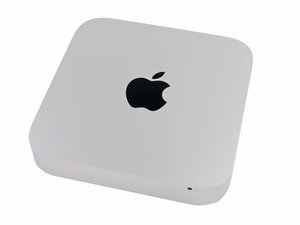
Announced on October 16, 2014, identifiable by the model number A1347 and EMC 2840.

Can I replace HD?

Recently, I purchased a Mac Mini 2014 A1347 model. I understand the RAM is soldered to the board and is not upgradeable. My next thought is to replace the HD and/or add a second HD.

Currently, I am running Mojave on this computer and haven’t had any problems. I was thinking of at least installing a second drive but I am not sure if I need to buy a HD tray or HD cable.

Update (05/20/2019)

If I didn’t want to replace the main HD, can I add a second drive? If so, do I buy an HD tray or HD cable?

Bu soruyu yanıtla Ben de bu sorunu yaşıyorum

Bu iyi bir soru mu?

Puan 0
Yorum Ekle

2 Cevap

Filtre ölçütü:
En Yararlı Yanıt

What is your current drive status?

Mac mini Late 2014 SSD Replacement

Mac mini Late 2014 Hard Drive Replacement

UPDATE

As you can see from the guides, adding an SSD is a 15 minute job while replacing the hard drive is a two hour job. Go here to select the size of drive to fit your needs:

OWC Aura Pro X2 SSD

Replace or upgrade the PCIe solid-state drive in a variety of Macs. Görseli

Ürün

OWC Aura Pro X2 SSD

$239.99

Mac mini Late 2014 SSD Görseli

Kılavuz

Mac mini Late 2014 SSD Replacement

Zorluk:

Orta

15 minutes

Mac mini Late 2014 Hard Drive Görseli

Kılavuz

Mac mini Late 2014 Hard Drive Replacement

Zorluk:

Orta

30 minutes - 2 hours

Bu yanıt yardımcı oldu mu?

Puan 2

2 Yorum:

I am not sure what you are asking "current drive status". The computer came with the existing HD. I think it is SATA but I am not sure. The computer is working fine.

tarafından

If you have a hard drive model then you can add the blade SSD. If you add the SSD you can make it the boot drive speeding up the boot and running the apps.

Otherwise your only option is replacing the HD with a larger drive if that's what you want.

tarafından

Yorum Ekle

About your question. This unit is very much upgradeable when it comes to adding bigger or better hard drive. Only issue is its not as easy as just popping out a cover and pulling out the drive. To answer your exact question, this model comes with a regular mechanical drive and can be upgraded to a bigger size or even an SSD. You wont need any adapters or cables.

Bu yanıt yardımcı oldu mu?

Puan 0

2 Yorum:

I understand what you are saying. However without taking it apart, there appears to a spot below the silver plate to add a second drive. Obviously, I need an HD cable or tray to connect it to the board.

tarafından

Adding a second hard drive is not possible. You can only add a blade SSD drive.

tarafından

Yorum Ekle

Yanıtını ekle

jkbmjp sonsuza kadar minnettar olacak.
İstatistikleri Görüntüle:

Son 24 Saat: 0

Son 7 gün: 0

Son 30 gün: 5

Her zaman: 202