Bu çeviri bir makine tarafından oluşturulmuştur ve henüz bir kişi tarafından incelenmemiştir. Bu dili konuşuyor musunuz? İnceleme için.
Giriş
Dell Chromebook 3110 cihazınız şarj tutmuyor, pil hızlı bitiyor veya yalnızca prize takılıyken çalışıyorsa, muhtemelen bir değişim pili takmanız gerekiyordur.
Bu adım adım kılavuz, Dell Chromebook 3110 cihazınızdaki pili nasıl güvenli bir şekilde çıkaracağınızı ve değiştireceğinizi gösterecektir.
Güvenlik için:
- Onarıma başlamadan önce pili %25'in altına kadar deşarj edin. Bu, pilin hasar görmesi durumunda yangın riskini azaltır.
- Eski piliniz şişmiş, kabarmış görünüyorsa veya olağandışı kokuyorsa dikkatli olun; şişmiş lityum iyon piller tehlikeli olabilir. Vikimize göz atın: Şişmiş Bir Pille Ne Yapmalı.
Dell Chromebook 3110 pil değişimine başlamadan önce şarj cihazının fişini çekin ve cihazınızı tamamen kapatın.
Neye ihtiyacın var
-
-
-
Dizüstü bilgisayarı temiz bir çalışma alanına ters şekilde yerleştirin.
 FixBot'a Sor
-
-
-
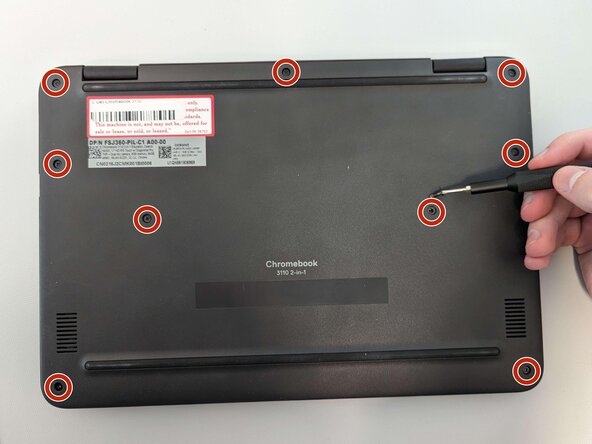
Dizüstü bilgisayarın arka kapağındaki dokuz adet 4 mm vidayı bir Yıldız tornavida kullanarak sökün.
-
-
-
-
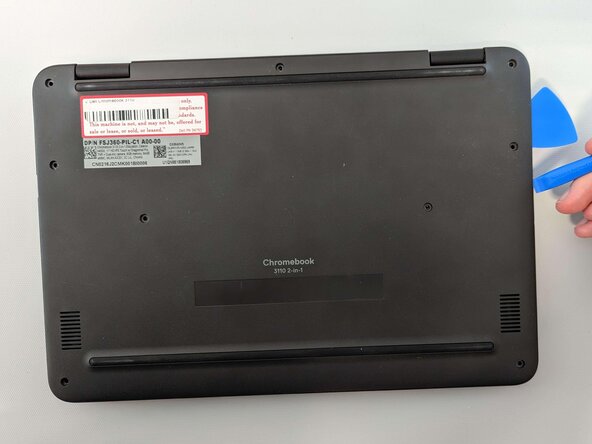
Bir açma penası ve bir açma aleti kullanarak arka kapağı dizüstü bilgisayardan ayırmaya başlayın.
-
Ellerinizi kullanarak arka kapağı tamamen çıkarın.
-
-
-
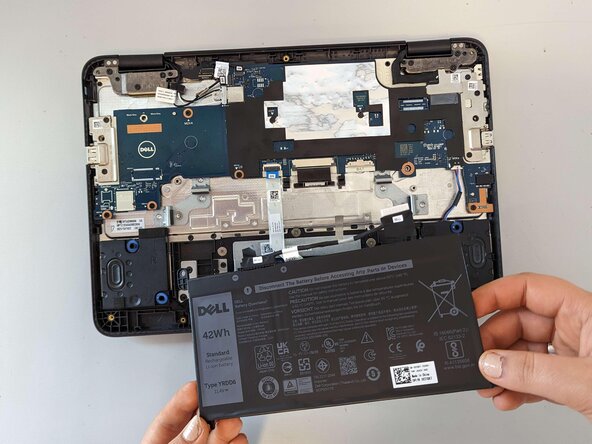
Batarya kablosu başlığını anakarttan bataryaya doğru nazikçe çekerek bataryayı anakarttan ayırın.
-
Yıldız tornavidayı kullanarak batarya üzerindeki üç vidayı çıkarın.
-
-


Cihazınızı tekrar toplamak için bu talimatları ters sırada uygulayın. Optimum performans için, bu kılavuzu tamamladıktan sonra yeni taktığınız pili kalibre edin.
Elektronik atıklarınızı R2 veya e-Stewards sertifikalı bir geri dönüşüm tesisine götürün.
İptal et: Bu kılavuzu tamamlamadım.
4 farklı kişi bu kılavuzu tamamladı.

Ekip

Marist, Team 1-6, Chaterdon Spring 2023 Marist, Team 1-6, Chaterdon Spring 2023 üyesi
MARS-CHATERDON-S23S1G6
2 Üyeler
22 adet Kılavuz yazıldı
