Bu çeviri bir makine tarafından oluşturulmuştur ve henüz bir kişi tarafından incelenmemiştir. Bu dili konuşuyor musunuz? İnceleme için.
Giriş
MacBook Pro 13" Unibody Mid 2010 cihazınızın pilini değiştirin. Piliniz şişmişse, gerekli önlemleri alın.
Neye ihtiyacın var
-
-
-
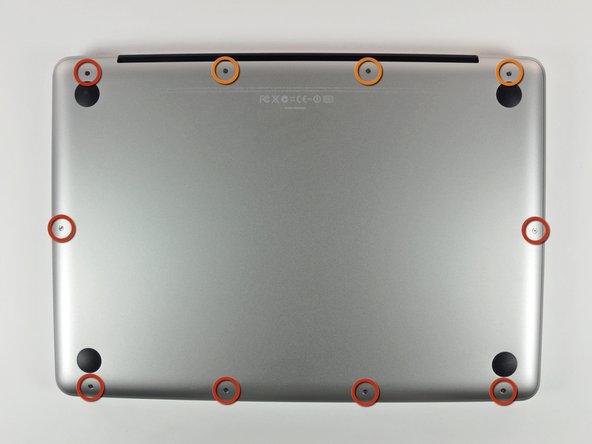
Alt kasayı MacBook Pro 13" unibody'ye sabitleyen aşağıdaki 10 vidayı çıkarın:
-
Yedi adet 3 mm yıldız vida.
-
Üç adet 13.5 mm yıldız vida.
 FixBot'a Sor
-
-
-
Alt kasayı hafifçe kaldırın ve montaj tırnaklarını kurtarmak için bilgisayarın arka kısmına doğru itin.
-
-
-
-
-
-
Bataryayı üst kasaya sabitleyen aşağıdaki tri-point vidaları çıkarın:
-
Bir adet 5,5 mm tri-point vida.
-
Bir adet 13,5 mm tri-point vida.
-
-
-
Batarya konnektörünü anakart üzerindeki soketinden çıkarmak için plastik kanırtma aparatının düz ucunu kullanın.
-
-
-
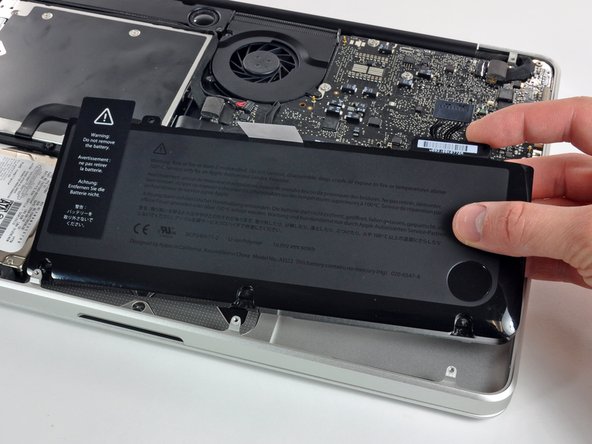
Bataryayı üst kasadan dışarı kaldırın.
-
%100 doluluğa ulaşana kadar şarj edin ve ardından en az 2 saat daha şarjda bırakın. Daha sonra fişten çekin ve bataryayı bitirmek için normal şekilde kullanın. Düşük batarya uyarısını gördüğünüzde çalışmanızı kaydedin ve bilgisayarınız batarya bitmesi nedeniyle uyku moduna geçene kadar açık tutun. En az 5 saat bekleyin, ardından dizüstü bilgisayarınızı kesintisiz bir şekilde %100 doluluğa kadar şarj edin.
-
Yeni bataryanızı taktıktan sonra herhangi bir olağan dışı durum veya sorun fark ederseniz, MacBook'unuzun SMC'sini sıfırlamanız gerekebilir.
-
-


Cihazınızı yeniden toplamak için bu talimatları ters sırayla uygulayın.
İptal et: Bu kılavuzu tamamlamadım.
694 farklı kişi bu kılavuzu tamamladı.

26Kılavuz Yorumları
You guys are awesome! My granddaughter spilled a whole coke on the Mac and it went fizz! After some weeks I took it to the Apple store where it was declared it dead. They offered me a refurbished machine for $800, but insteaed I came home, took the disk out and hooked it via a USB carrier to another Mac which proved that the disk had not been harmed. I put it back in the machine and booted up at which point it became obvious that the battery was dead. One pass at Google turned up IFixIt where I found the battery and the correct, goofy tri-point screwdriver. The battery arrived a bit ago and the Mac is up and running as if nothing happened . . . a tidy savings of $650!
Thanks so much1
This was a total life saver! A few weeks ago my house was hit by lightning and even though my computer wasn't plugged in (thank God!) my charger was completely fried. I ordered a new charger but my computer still wasn't working- Apple said my computer was done for. A friend said it was probably my battery and told me about ifixit.com. I was able to buy a new battery and change it myself (it was so easy!!!). Saved me from spending a bunch of $$ at the Apple store. I move out of the Country in a few weeks and didn't know what I was going to do without a computer. Thanks ifixit!!!
When I followed this exactly, I booted up my MacBook to see that my battery had an x through it with the no battery availible popping up when I scrolled over it. I (stupidly) left the computer on while I browsed for a solution. The whole time my charger showed a green light. Suddenly the computer turned off and hasn't been able to be turned back on since despite switching to another battery and another charger. The charger still shows a green light, which means the battery is either fully charged or installed incorrectly. I don't understand how it can be installed incorrectly when the only part to put it into the computer is the plug in. Please someone help me, I have no idea how to fix it and have made multiple forums on here asking for help, to no avail.
Your connector or socket may have broken. Open the Mac and check if you missed something.
