Giriş
If your Sony WH-CH710N headphones no longer hold a charge or power off sooner than they should, the battery may need to be replaced. This guide will walk you through each step of the process, from safely opening the headphones to removing the old battery and installing a new one. With a few tools and careful handling, you can restore your headphones’ battery life and keep them working like new.
Before beginning the repair, review the Sony WH-CH710N Not Charging troubleshooting page for possible solutions. If you have confirmed that the battery is damaged, power off the headphones and disconnect them from the charger or audio cable before proceeding.
Caution: If the battery appears swollen, puffy, or emits a strange odor, handle it with extreme care. Swollen batteries can catch fire or explode if damaged. Before proceeding, review the What to Do with a Swollen Battery guide.
Neye ihtiyacın var
-
-
-
Pinch the right ear pad cushion and gently pull it away from the ear cup to remove it.
 FixBot'a Sor
-
-
-
Use a Phillips #1 screwdriver to remove the four 4.0 mm screws from the outer ear plate.
-
-
-
Using even pressure around all edges, gently pull the black outer ear plate away from the cup of the earphone.
-
-
-
-
Use a Phillips #1 screwdriver to remove the four 3.0 mm screws from the inner ear plate.
-
-
-
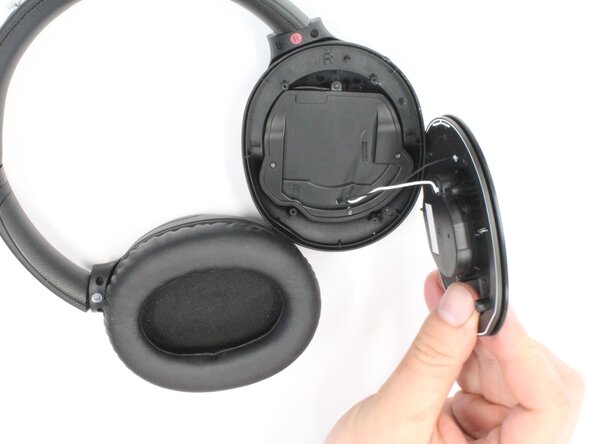
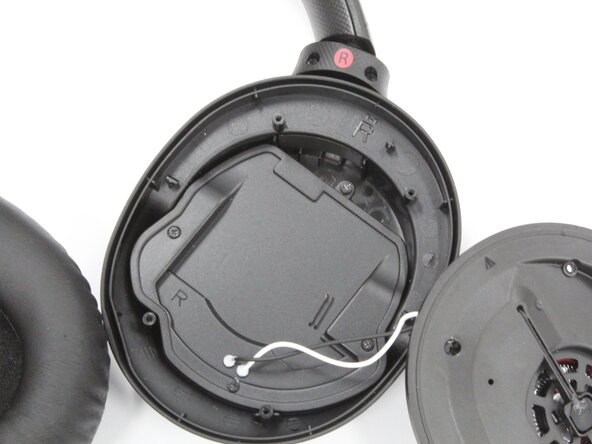
Gently grasp the black inner ear plate and pull it away from the cup of the earphone, exposing the internal components.
-
-
-
-
-
Push on alternating sides of the JST connector, to release it.
-
If that doesn't work, use a pair of tweezers to firmly grip the sides of the battery connector and pull straight away from the socket. Hold the tweezers closer to the connector to get a better grip.
-
-
-
Insert some isopropyl alcohol or adhesive remover underneath the battery to soften the adhesive.
-
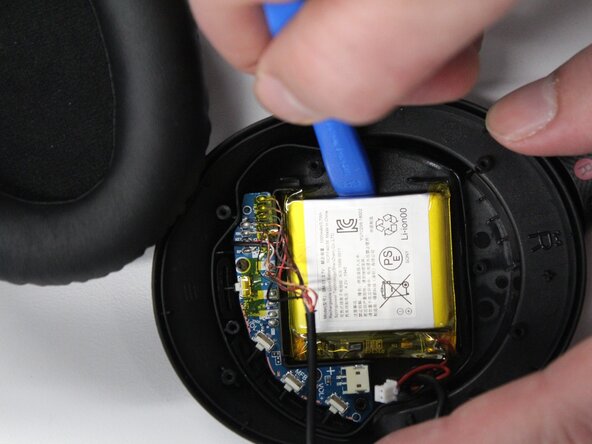
Gently slide a plastic opening pick around the edges of the battery to loosen the adhesive before you remove it.
-
Use a suction cup to lift the battery out.
-
-






To reassemble your device, follow these instructions in reverse order. Take your e-waste to an R2 or e-Stewards certified recycler.
İptal et: Bu kılavuzu tamamlamadım.
Bir başkası bu kılavuzu tamamladı.

Ekip

Purdue University Northwest, Team 7-10, Dieterle Spring 2026 Purdue University Northwest, Team 7-10, Dieterle Spring 2026 üyesi
PNW-DIETERLE-S26S7G10
4 Üyeler
14 adet Kılavuz yazıldı
